




Two business coaches launched their coaching businesses on the exact same morning.
With the same training…
The same ambition…
And the same dream of building a roaring practice that changed lives.
But from day one, they chose two very different paths to reach their future clients. (Plus, they didn’t buy the same brand of underwear—but I digress.)
The first coach dove headfirst into social media. He posted daily, sometimes two or three times a day. Yeah, he produced punchy, bite-sized content that followers latched onto. His posts were short, motivational, and digestible—perfect little snacks for impatient prospects with scrolling thumbs.
And at first, this method of fishing worked.
He got attention, early followers, and even a couple clients.
The dopamine spike felt good—real good—but like all sugar highs, it didn’t last.
Meanwhile, the second coach chose the path of the tortoise—slow and steady wins the race. While his counterpart was bathing in instant “attention,” this guy was quietly churning out blog posts. SEO-primed articles over 2,000 words, complete with jaw-dropping infographics.
He didn’t give his prospects cute inspirational blurbs.
Depth of content was the order of the day.
Handed them frameworks.
And he gave them real strategies and real teaching that built real authority—LIKE A BOSS.
It was a thankless path, a “you ain’t gonna make it” kind of grind. But he stayed persistent. He ignored the fast-track façade his buddy seemed to be riding and doubled down on long-form content that had substance.
What a Difference Blog Content for Coaches Can Make
And guess what?
A few months later, the cracks in Mr. Social Tycoon’s master plan started looking like an elephant’s ass. (At least it started smelling that way.) Sure, his mom, girlfriends, and drinking buddies kept clicking “like” on his Instagram posts, but even they were getting tired of the game.
Then came the Vail trip.
Mr. Social Media Coach took a week off to ski—because hey, he deserved it.
But when he got back?
His audience had vanished.
Bye-bye…Hasta la vista, baby!
Suddenly, he felt like a mouse in a rusty trap, scrambling to get the momentum back. He had to pump out more posts, more noise, more everything—just to claw his way back into the algorithm’s good graces.
Slow and Steady Wins the Race
The blogging coach, on the other hand, kept his slow, steady, beautiful pace. Sure, he used a few social platforms to promote his posts, but ranking in Google proved to be the game-changer. Visitors stayed longer. They clicked through his other posts. They bought his coaching courses, his eBooks, his templates, and started filling up his events.
His authority began to flourish. His posts were shared—because he was trustable. Business people found him online, quoted him, and shared his work on social media. (Yeah, that’s right, Ginga… social media!)
Because his content was written for the coaching industry and packed with real insight, readers stuck around. They actually read the posts, left comments, and shared the article. All of this reduced his bounce rate, and the Google overlords rewarded him handsomely.
And the real beauty?
His posts stayed online for years—YEARS—pulling in more traffic than any social post could ever dream of.
Meanwhile, Mr. Social Coach?
Let’s just say I could tell you he turned his business around…
…but that would be a lie.
Life is messy.
Sweaty blobs of gray matter float through the air. And the only people who knew what happened to him were his mom and his drinking buddies. (His girlfriends kinda bailed when he moved back in with mom.)
Who knows?
He’s probably working checkout at Walmart.
Two business coaches.
Same training.
Same ambition.
Two wildly different outcomes.
So what made the blogging coach more successful?

What Blogs Can Do That Social Media Never Will
There are a ton of reasons why a business or executive coach should blog, versus using social media. Here is a comprehensive list of why you should do so:
- Build authority even while you’re asleep
- Attract readers long after you hit “publish”
- Rank in Google and send you clients for YEARS
- Turn strangers into warm leads through long-form trust
- Position you as the coach who actually knows things
- Let you showcase real frameworks, not tiny “tips”
- Create content assets that work like little digital employees
- Give you a home base you actually own (not rented land)
- Turn blog posts into emails, carousels, reels, videos, and scripts
- Collect leads with freebies, templates, and downloads
- Let readers binge your best work in one sitting
- Increase your perceived value without you lifting a finger
- Make you look “established” even if you’re brand new
- Help serious buyers evaluate whether you’re the real deal
- Keep working even when you’re skiing in Vail, napping, or eating tacos
- Stand out when everyone else is yelling into the algorithm void
-
Build your email list automatically
- Convert colder audiences because long-form = trust
- Give you consistent, compounding organic traffic
- Provide unlimited content ideas for social media (zero burnout required)
- Make you look like a long-term thinker in a short-term world
- Help clients understand your process—not just “feel inspired”
- Serve as your digital portfolio for your brain, not your selfies
- Turn one article into 25+ pieces of content with almost no extra thinking
- Keep your marketing alive even if your social accounts get hacked, banned, or ignored
- Turn casual readers into long-term fans
- Give your coaching business an actual backbone — not a hamster wheel
- Help you charge more because real authority = real money
- Make people reach out saying, “I feel like I already know you.”

Why Blogging Wins for Coaches (And Why This Guide Exists)
If you’re a coach—or a copywriter who works with coaches—you’ve probably noticed something: Posting on social media feels like trying to bail water out of a sinking rowboat with a spaghetti strainer.
You post and get a few likes.
Next, you ride a tiny dopamine wave.
And then… nothing. (There, I said it!)
Your content disappears faster than a free donut at a Weight Watchers meeting.
Meanwhile, the coaches who publish real, valuable blog content—the kind that teaches, guides, and actually helps people—quietly build authority.
They attract better clients. They get found on Google. Their content keeps working even when they aren’t.
If you’ve been writing your heart out, posting everywhere, burning out, and wondering why your coaching business still feels stuck in neutral…
Friend-o, you’re about to see why.
This is your ultimate guide to creating blog content for coaches—the long-form, SEO-smart, client-attracting kind that separates the “I hope somebody calls me” coaches from the “My calendar is full and I raised my rates again” coaches.
In this guide, I’m going to show you exactly how coaches can use blogging to:
- build authority
- establish credibility
- attract premium clients
- reduce burnout
- create a content engine that works 24/7
- dominate their niche.
By the time you finish this behemoth, you’ll know how to create blog posts so good they make Google whisper, “Sweet mother of mercy… rank them higher.”
This isn’t 2018 anymore, and this isn’t about “blogging for money.”
This is about blog content for coaches—real, strategic content that builds a brand, attracts clients, and grows a coaching business with less stress and more strategy.
And yes… somewhere in this guide, you will absolutely learn how to write posts so effective they make Batman look like Broke-man. (But we’ll keep that between us.)
Before You Start Blogging: Build a Foundation That Doesn’t Collapse Like Wet Cardboard
Before you dive into creating blog content for coaches, you need one thing: a reason to keep going on the days you don’t feel like showing up.
Blogging is a long game—rewarding, profitable, authority-building—but make no mistake, it’s still work.
And nobody is going to stand behind you with a cattle prod yelling, “Write the H2, Karen!”
You need a foundation, a clear purpose, a finish line that isn’t blurry. Most coaches and copywriters fail at blogging for one simple reason: they leap into the content world like skydivers with no parachute, publishing without a plan and hoping inspiration will magically turn into momentum.
Spoiler alert—it never does.
Get Clear on What You Want Your Blog to Do for You
Maybe you want:
- More clients
- Higher conversion rates
- A marketing asset that works even when you don’t
- To build authority in your niche
- To rank for “blogging for coaches” or other juicy keywords
- To create evergreen content you can repurpose for years
- To stop sprinting on the social media hamster wheel and build something that lasts
Whatever the goal, name it, write it down or Tattoo it on your frontal lobe. (Okay, maybe that’s a bit extreme unless you really like needles.)
Because a blog without a mission is like a coach without a niche—confused, exhausted, and probably yelling into the void.
Two Simple Tools to Keep You Consistent (So You Don’t Tap Out by Week Three)
Here are two simple tools that can keep you consistent so you won’t crash and burn in your first few weeks.
And the best part? We’re not reinventing productivity here.
These aren’t fluffy “manifestation vibes” or motivational whispers from the universe. They’re real, practical tools I’ve used in my actual life.
The first is what I lovingly call the Vision Quest Board. Years ago—back when I was a meat company salesman, cutting out inspirational pictures like a middle-aged Pinterest mom—it helped me stay laser-focused on my goals.
And shockingly, it worked. Why? Because every day those goals were staring me down like a drill sergeant.
For blogging, you can do the same: print out your traffic goal, revenue goal, email subscriber goal, maybe even your future “Top 10 Blog Content for Coaches” badge from Google.
Stick them right where you write. And when you hit a milestone, slap a giant X through it. That moment feels like winning the emotional lottery.
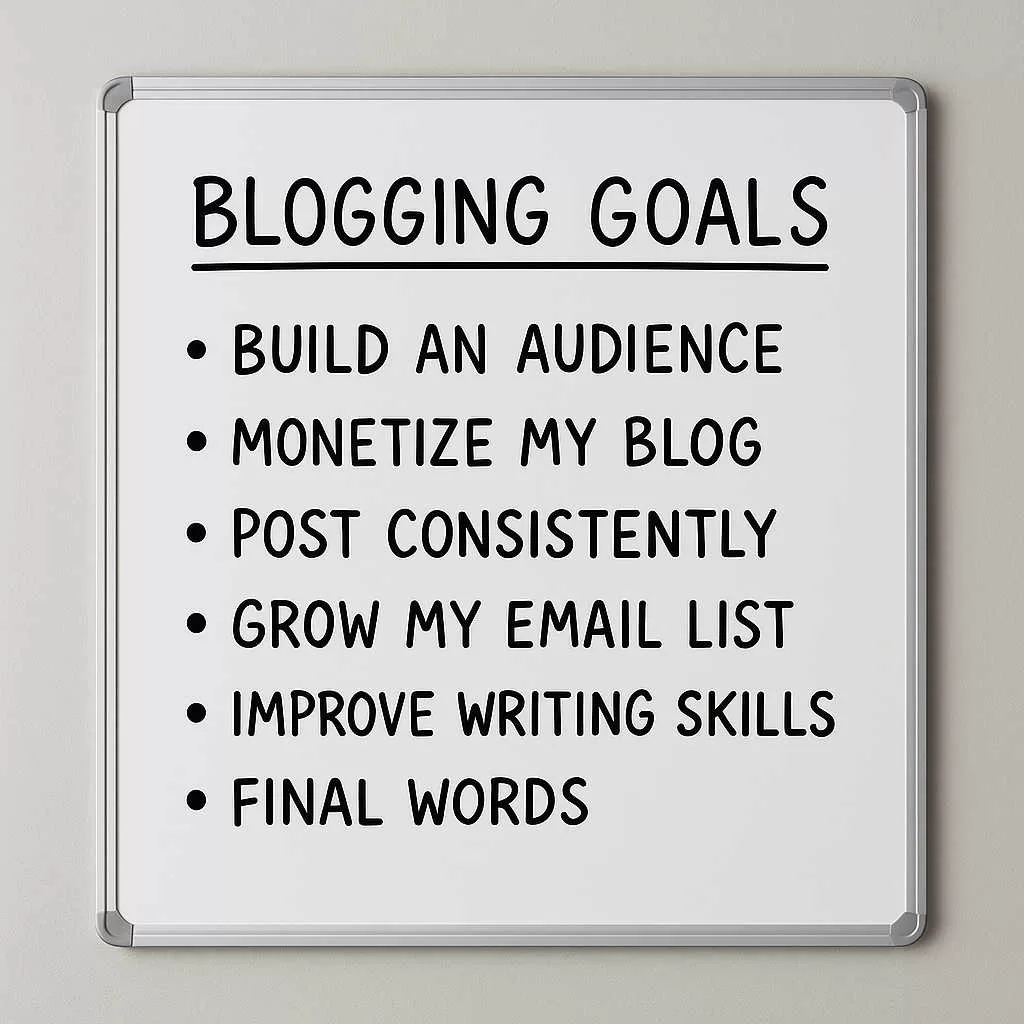
Use The Whiteboard of Unrelenting Accountability
This thing has powered:
- A house renovation
- A Master’s degree
- And now, the writing of this 10,000-word monster
A whiteboard list keeps you from wandering into creative chaos.
Let’s say you’re creating a post called:
“How to Write High-Converting Blog Content for Coaches.”
Your list might look like:
- Research keywords
- Collect 10 competitor posts
- Build outline
- Write intro
- Write subheads
- Write 500–1,000 words per section
- Build the CTA
- Create graphics
- Polish the draft
- Optimize SEO
- Publish
- Promote
Scratch each task off as you go.
You’ll feel like the Hercules of content creation. This works because it gives you progress you can see, not just vibes you can feel.
Reward Yourself Like a Grown Adult Who Did the Thing
Once you complete a blog post, don’t just slide it into WordPress and move on.
Reward yourself.
Buy a book.
Grab a course.
Take your significant other out for tacos.
When my wife and I finished renovating our house, we celebrated in Colorado.
When I finish a massive writing project, I still treat myself.
Rewards matter….
Consistency and structure matters…
This is how you stay committed to long-form content creation—not by hoping motivation magically floats down from the heavens.
Don’t Start Blogging Yet—Here’s What Coaches Need First
Before you publish a single piece of blog content for coaches, we need to have a grown-up conversation. If you and I were sitting across the table at a coffee shop, I’d tell you the same thing:
“Don’t start blogging yet. Not until you’ve got your foundation locked in.”
Blogging isn’t magic. It doesn’t sprinkle fairy dust on your coaching business. It works—beautifully, powerfully—but only if you’ve built the right foundation first. And no, I don’t mean “find your passion,” “follow your bliss,” or whatever inspirational wallpaper your cousin Becky posts on Facebook.
I mean real, practical essentials.
You need a platform you actually own and dedicated time to write (not the leftover scraps after scrolling Instagram). Also, you need a way to capture email subscribers so your blog traffic doesn’t disappear into the ether. And you need a simple plan—a real plan—for distributing your content so it reaches actual humans, not just your mom refreshing your homepage.
Think of your blog like a house.
If the foundation is shaky, everything you build on top of it will wobble, crack, or slide off into the neighbor’s yard. But once the basics are in place? Then you can start writing the kind of high-converting, authority-building content that brings in clients for years.
Now let’s talk about the foundation piece coaches love to ignore…
Choosing the Right Blogging Platform (Because Coaches Need a Home Base They Own)
Alright, coach — lean in. Before you can write powerful, long-form blog content for coaches, you need a solid place to put it.
Not just anywhere, or the cheapest option, or whatever looks cute on Pinterest.
You need a home base.
A platform that can grow with you.
A digital headquarters you actually own.
Because if your entire coaching business sits on a rented patch of internet land, you’re one algorithm update away from shouting into the void.
Let me give you the straight talk from someone who has tested more platforms than I care to admit. Years ago, I started on Google’s Blogger because, well… it was free, and I wanted to see if I even liked blogging. And honestly?
It wasn’t terrible…Simple… And it was clean.
Also, it was great for students when I was a tech teacher—they could experiment, publish posts, and learn the ropes without spending a penny.
But for a real coaching business?
Nope. Cute, yes. Professional, no.
And the biggest problem? You don’t own it. Google does.
Which means if Google wakes up one morning, decides it’s bored, and tosses Blogger into the tech graveyard—poof. Your content can disappear faster than a ghosted Tinder match.
I Tried Them All
Next, I tried Wix.
And Wix is… fine.
Great for a simple website.
Wonderful if you’re building a portfolio.
Marvelous if you want drag-and-drop everything.
But if you’re a coach who wants to publish authoritative content, rank on Google, grow an email list, or create serious long-form posts,
Wix runs out of steam fast. Using it for blogging is like running a marathon in flip-flops. Technically possible, but by mile two you’re questioning all your life choices.
That leaves us with the platform that serious coaches use: WordPress.
Love it or hate it, WordPress is the powerhouse. It gives you full control, full ownership, SEO flexibility, endless customization, and everything you need to create the kind of in-depth blog content for coaches that builds authority, trust, and leads.
If you’re building a coaching brand—not just a cute website—WordPress is your home base. Period.
The Pros and Cons of Major Blog Platforms
Let’s start with the two heavyweight contenders in the blogging universe: WordPress and Blogger.
These two platforms have been around since the dinosaurs roamed the internet, and both still pack enough heat that new coaches inevitably ask, “Which one should I use?”
Before we go further, there’s an important distinction you need to know about WordPress: there’s a free version (WordPress.com) and a paid version (WordPress.org). The paid version is the one you want—the grown-up, professional version that gives you full control and lets you actually build something that can make money. The free one is basically the demo version that keeps asking you if you’re ready to upgrade yet.
WordPress Pros
WordPress (the paid version) costs money, yes—but that’s because you own it. Think of it like owning your own house instead of crashing on Google’s futon (Blogger).
When you pay for hosting, you control the platform, the content, the design, the plugins—everything. If you ever decide you’re done with blogging, you can shut it down with one click. No drama. No “Dear User, we regret to inform you…” emails.
Because WordPress is “open-source,” developers all over the world create apps for it called plugins, and these plugins are what make WordPress ridiculously flexible. Want social sharing buttons?
There’s a plugin. Want email opt-ins? Plugin. Want your blog to look like a minimalist design studio in Brooklyn? Plugin. Want it to look like an online coaching empire? Plugin. Basically, if you can think of it, someone’s already built a plugin for it at 3 AM while eating leftover pizza.

The Must-Have Plugins If You’re Blogging for Money
Since we’re talking plugins, here’s the greatest-hits list—stuff built specifically for coaches, creators, and anyone who wants to monetize their blog without breaking a sweat.
Easy Digital Downloads – Lets you sell digital goodies (eBooks, templates, videos) in minutes and works with PayPal, Stripe, Braintree, and Amazon Payments. No tech degree required.
Membership Plugins – If you want to build a paid community or subscription offer, this is your tool. Turn your blog into a members-only coaching vault.
Affiliate Link Managers – Perfect if you promote affiliate products. Keeps all your links organized and clean so you don’t end up with URLs longer than the Old Testament.
Mailchimp Plugin (Free) – If you want to make money online, you need email. Mailchimp plays nice with WordPress and helps you build your list—your most valuable asset.
LearnPress – Build and sell full courses right on your site. If you have a coaching curriculum in your head, this is how it becomes revenue.
WP125 – A simple tool for displaying and managing small banner ads on your site. Great for affiliate revenue or sponsor placements.
AdSense Plugin WP Quads – Makes running Google ads stupidly easy. Just tell the plugin where you want ads to show up and boom—done.
Pretty Links – Turns ugly URLs into short, branded links. Plus, you get built-in tracking to show where your clicks are coming from.
But Wait…There’s More!
Shopify Plugin – Adds a fully functioning store to your WordPress site, complete with checkout, carts, and refund pages.
Yoast SEO – The undefeated champion of SEO plugins. Helps your blog rank higher in Google so you can get traffic, leads, and eventually that beach-martini money.
HelloBar – One of my personal favorites. Helps you build your email list with beautiful pop-ups, sticky bars, and slide-ins. It works. It works a LOT.
JetPack – Speeds up your site, improves security, manages media, and gives you superhero-level performance. A fast site = more readers = more money.
Other Pros of WordPress
If all those money-making tools weren’t enough, here’s more: WordPress lets you change your entire blog design with just a few clicks. Can’t decide on a style? No problem.
There are thousands of free and paid themes available, which means you can reinvent your brand as often as your coaching niche changes.
It’s also extremely secure, and with backup plugins, you can protect every post, image, and page. And if you ever want to move hosts or change your domain name, WordPress packs its bags neatly and moves with you like a champ.
WordPress Cons
Now, I know I’ve made WordPress sound like the golden child of blogging platforms—and honestly, it kind of is—but nothing’s perfect. First off: there’s a learning curve. Not a Mount Everest learning curve, but definitely a “you won’t master this in a day” situation. You don’t need coding skills (thank God), but you’ll need a few hours to understand the basics.
You’ll also have to back up your files, though plugins make that easy. And yes, WordPress updates often—sometimes a little too often. If you let updates pile up, you might run into problems with certain tools. Fortunately, many hosting companies will update things automatically for you.
And finally, like any website, your WordPress site can be hacked. Rarely, but still. I’ve had it happen once, and my hosting service (HostGator) handled it like a digital hazmat team. But it’s something you need to keep on your radar.
Blogger’s Pros
Blogger is owned by the internet overlord itself—Google. Because Google basically owns half the internet and has the GDP of a small country, it can spin up platforms like Blogger and hand them out for free like candy at a parade.
And honestly, one of the biggest perks of Blogger is exactly that: it costs you nothing. No hosting bill. No domain fees unless you want one. Just a Gmail account and a pulse, and you’re ready to launch.
And here’s where Blogger gets downright wild: you can create as many blogs as you want. I ended up with 32 of them—one for each class I taught back in my tech-teacher days, one to help sell a house, one for weird scholarships, one for my Master’s program, and plenty that I created just because… well, they were free.
When you don’t have to pay for anything, spinning up a new blog becomes something you do between sips of coffee.
Blogger is Easy to Use
Blogger is ridiculously easy to use, too. If you’ve got a Google account, you’re basically two clicks away from having a fully functioning blog. Google built a bunch of what they call “gadgets,” which are Blogger’s version of plugins.
You don’t install anything—just drag the gadget where you want it and boom, it’s live. Same for the layout. Drag-and-drop everything. Pick from premade themes. Launch a site in minutes. It’s beginner heaven.
And if you’re completely new to blogging, Blogger lets you make money surprisingly fast. Since Google owns both Blogger and AdSense, you can connect ads to your site with very little effort. One minute you’re setting up your layout; the next minute, you’ve got ads showing up like polite little visitors who promise to leave you a nickel every time someone clicks.

Blogger’s Cons
But here’s the flip side: because Blogger is free, most people don’t take it seriously. When you don’t have money invested in something, it’s easy to abandon it the second you get bored. It’s the same reason free seminars are always “meh” and the paid ones feel like life-changing TED Talks. If you don’t have skin in the game, you don’t have urgency in the game.
And the biggest issue? Google owns everything you publish. That means Google can take down your content whenever it feels like it. I’ve had images vanish. I’ve seen friends lose entire chunks of posts. If your content bumps into a policy, or if Google decides your blog isn’t worth the digital storage space, poof—it’s gone. Google giveth, and Google brutally taketh away.
Blogger also has a serious lack of tools. Unlike WordPress, where developers build new plugins every time they get bored on a Saturday night, Blogger only has whatever Google feels like releasing.
If Google doesn’t build it, you don’t get it. Themes are also limited, which means your blog will often look like hundreds of others—fine if you’re posting cat photos, not so great if you’re competing in a niche full of serious brands.
The Danger of Using Blogger
There’s another major limitation: you can’t move your blog anywhere else. Once you build on Blogger, your blog is basically cemented into Google’s basement. There’s no clean export, no easy migration. What goes into Blogger stays in Blogger.
You can customize your design somewhat with tools like TemplateToaster, which lets you build a more unique look without messing with code. But for bigger structural changes or premium-level customization, Blogger just can’t keep up.
And one more kicker—you can’t upload files like PDFs or Word documents directly to Blogger.
So if you want to create a lead magnet or a downloadable eBook for your coaching audience, you’ll have to store it on Google Drive, Dropbox, or another service and link to it externally.
Finally, and this is a big one: Blogger is not SEO-friendly. People assume that because Google owns Blogger, their posts will get special treatment. Please know: Google does not play favorites. Google wants high-quality, optimized content—and Blogger offers no powerful SEO tools like Yoast to help you tune your posts. If you use Blogger, you’re basically on your own. Write great content, build backlinks, and hope for the best.
Wix Pros
Wix’s biggest selling point is simple: it’s stupidly easy to use.
Their templates look great right out of the box, and with over 500 free designs to choose from, you can create a site that looks like you hired a designer—even if your actual design skills peak at choosing a Netflix profile icon.
Because your site lives on Wix’s servers, you never have to worry about security patches or technical emergencies. If something breaks, you don’t fix it—you just call their support team and let them earn their paycheck.
Wix also comes with both a free plan and paid plans, so you can test-drive the platform before committing your credit card. The interface is extremely beginner-friendly, with no steep learning curve.
You could sign up in the morning and have a halfway decent site by lunchtime.
Drag. Drop. Publish. Done.
And yes, if you want to try blogging for money, Wix technically lets you set up an online store pretty easily. Their built-in shop builder makes selling products simple, even if the rest of the platform isn’t exactly built for serious monetization.
Still—if all you need is a clean site and an online storefront, Wix can get you up and running fast. And when something goes sideways? Their customer support is surprisingly responsive, which is more than I can say for half the tools coaches use.
Wix Cons
Now for the part Wix doesn’t put on the sales page. One of the biggest complaints about Wix is the pricing.
Once you upgrade to a plan that actually gives you the features you want, you’ll often pay more than you would for regular hosting plus the paid version of WordPress.
Their pricing starts cheap—around four bucks a month—but even then, Wix plasters ads across your site like digital bumper stickers. Want those gone? You’ll pay extra.
Wix also has limited features compared to a full-blown platform like WordPress. If you want even basic extras—like enhanced social media tools—you’ll have to go to the App Store and buy them.
These apps aren’t deeply integrated tools; they’re more like buttons glued to the side of your site that open external pages. So visitors click a social icon expecting something sleek, and instead a whole new tab blasts open like they’ve been teleported off your site entirely. Confusing? Yep. Professional? Not exactly.
In short: Wix is great if you want something simple, fast, and attractive. But if you want deep customization, serious SEO, long-term scalability, or real blogging power for your coaching business… Wix will hit its ceiling long before you hit yours.
Squarespace Pros
Squarespace is the darling of designers for a reason—its templates look like something straight out of a high-end branding agency. Sleek, professional, visually dramatic… it’s basically the runway model of website builders.
And those templates are built to automatically resize on mobile devices, so whether someone’s browsing from a laptop, tablet, or the phone they drop three times a week, your site will still look polished.
The platform also comes with a “Style Editor,” which sounds fancy because it is. It lets you customize your site with drag-and-drop controls, no coding required.
You can adjust layouts, colors, spacing, and fonts without touching a single line of HTML. For coaches who want a professional look without hiring a web designer or learning tech wizardry, Squarespace is a strong fit.
Squarespace Cons
Now, here’s where Squarespace stops being the teacher’s pet. Even though the templates look incredible, the learning curve can be steeper than you’d expect.
The interface isn’t immediately intuitive, and you may find yourself spending more time than you planned figuring out how to upload images or wrangle the Style Editor.
And once you get into customizing? Buckle up. Squarespace gives you a ton of options—so many that you can easily disappear down a rabbit hole, tweaking settings until you forget why you logged in to begin with. It’s beautiful, but it can turn into a perfectionist’s time-sucking nightmare.
Another drawback: Squarespace falls behind when it comes to mobile optimization. Unlike Wix or Weebly,
Squarespace doesn’t give you full mobile editing control. You can preview what your site looks like on different devices using Device View Mode, but you can’t directly optimize mobile layouts the way you can with other platforms. Basically, you can look…
Weebly Pros
Weebly is one of those “everything-in-one-place” platforms that tries to make blogging as painless as possible. Hosting, templates, drag-and-drop builder, the whole burrito—it’s all baked right into the platform.
You just sign up, click a few buttons, and you’re suddenly staring at the beginnings of a blog that looks like you put in way more effort than you actually did.
Once you’re inside, everything is straightforward. Build your layout with drag-and-drop pieces, hit publish, and boom—you’re blogging. For beginners who want a quick setup without wrestling with code or complicated settings, Weebly feels like a breath of fresh air.
Here’s another surprisingly solid perk: built-in security and backups. Most platforms make you buy extra tools or hire someone to protect your files. Weebly includes hacker protection and file backups even in its free version, which is one of the reasons it’s known for delivering good value.
It’s not glamorous, but it’s practical—kind of like driving a Honda Civic. It won’t impress your neighbors, but it’ll get you where you need to go.
Weebly Cons
Now here’s where things get squeaky. Weebly’s content management system tends to melt down once you add more than 10 pages. Your dashboard starts to look like a teenager’s bedroom floor—cluttered, chaotic, and impossible to navigate.
If you’re planning a blog with lots of content or long-term growth… Weebly may start wheezing early.
SEO is another weak spot. If you want Google to find your content and put it in front of the right people, you’re going to need a platform that plays nice with optimization tools.
Weebly—much like Wix and other DIY site builders—just doesn’t have strong SEO capabilities. It’s rare to see a Weebly site ranking well in a competitive niche, and that’s not an accident.
The community is also tiny. Unlike WordPress, where you’ve got millions of users, developers, and nerds eager to help you, Weebly leaves you mostly on your own. Yes, they have tech support if you break something—but when the platform is this limited, you shouldn’t need help in the first place.
And just like the other drag-and-drop platforms, if you ever decide you want to move your site elsewhere… too bad. Weebly doesn’t let you migrate your files. Once you build there, you stay there. Your content is glued to the platform like gum on a sidewalk.
Final Thoughts on Platform Choices
I’m spending all this time on platforms because choosing the wrong one is the fastest way to create future headaches. If you pick a platform you eventually outgrow, you may never be able to move your content—or worse, you might lose it. Nobody wants to rebuild a site from scratch after publishing months of blog content for coaches.
For me, the clear winner is still the paid version of WordPress. It’s flexible, customizable, secure, and built for long-term growth. Yes, there’s a learning curve.
And yes, you’ll probably spend a few minutes Googling “Why does this setting hate me?” But trust me—I’m not a tech guy and I learned it fast. It’s worth it if you’re serious about blogging for money or creating long-term content assets.
Alternative Platforms
If WordPress isn’t your thing, here are a few alternative platforms that might fit different needs:
Tumblr – A popular micro-blogging platform with built-in social features. Super easy, super fast, not great for long-term SEO.
Medium – Perfect if all you want to do is write. It’s like blogging inside a giant online community where people actually read. But you don’t really own anything, and you can’t customize.
Joomla – An open-source content management system for people who enjoy technical puzzles, coding challenges, and occasionally questioning their life choices. I’ve used it. It’s powerful—but definitely for techier folks.
Ghost – Minimalist blogging at its finest. If you want zero distractions and just want to publish posts quickly, Ghost is clean, simple, and fast.
Facebook Group Pages – Believe it or not, some entrepreneurs use their Facebook groups as full-blown blogs. Collin Theriot’s Cult of Copy is a legendary example. Tons of engagement, huge community, great for selling.
But remember: you’re squatting on Facebook’s property. If they don’t like something you post, they can shut you down instantly, and you can’t export a single file. It’s rented land, not owned land.

Find Your Niche Before You Begin Blogging for Money
Have you ever decided to go on a trip without the slightest clue where you were going?
Not exactly a winning strategy, right?
Well, blogging works the same way. Before you start cranking out posts and writing your buns off, you need to know what niche you’re actually writing for. This is the foundational step in your blogging-for-money journey. Skip it, and you’ll waste mountains of time writing for an audience that doesn’t exist.
(Ask me how I know.)
If you need a deeper dive, here’s a full post I wrote about this exact topic: 7 Steps to Claiming Your Niche Market.
A Value Story From a Marketing Legend
I once heard a story from the legendary marketer Dan Kennedy that nails this point perfectly. At one of his seminars, he talked about a retired couple who moved to a charming little coastal town and decided to open a store selling novelty items—lighthouse clocks, fish-shaped ashtrays, beach curiosities, the whole deal. Cute idea, right?
They bought a storefront, stocked their merch, opened for business… and torched through their retirement savings in a year.
Why?
Because they did zero niche research.
There were no other shops like theirs in the area — which wasn’t a “fresh opportunity,” it was a giant red flag. They didn’t consider that the town didn’t draw tourists, locals weren’t interested in novelty beach items, and the weather kept traffic low most of the year. Translation: they picked a niche no one wanted.
So yes—researching your niche upfront is non-negotiable. Decide early on who you’re writing for, what they care about, and why they should read (and eventually buy) anything you publish.
Here Are the Action Steps to Figure Out Your Blogging-for-Money Niche
Step 1: Make a List
Whenever I’m exploring ideas for what I want to blog about, I always start with three lists:
- Stuff I like to do
- Stuff I wish I could do
- Things I’m researching anyway
These three buckets help shake loose ideas you might not even realize are sitting right in front of you.
Stuff I like to do:
- Kayaking
- Blogging
- Drawing
- Using graphics programs like PaintShop
- Jazz improvising on trombone
- Non-fiction writing
- Fixing band instruments
- Writing advertising copy
Stuff I wish I could do:
- Direct a movie
- Write a sci-fi novel
- Paint landscape pictures
- Travel the world
- Invest money better
- Martial arts
- Become a public speaker
Things I need to do and have researched:
- Electric scooters
- Technology degrees
- Instructional design internships
- Water filter systems
- Local political issues
Niche Selection
Step 2: Drill Down to Find Your Niche Size
Alright, now we’re getting into the part where you make sure your niche isn’t the size of a thimble. Before you invest months creating blog content for coaches (or artists or underwater basket weavers), you need to know there are enough humans out there who actually care.
So let’s take the example from earlier — “Drawing.” If you Google the word “drawing,” you’ll get nearly 2 billion results. That’s not a niche; that’s the entire planet doodling on napkins. Massive, yes. Useful? Not really.
So now we refine. Let’s pretend someone likes drawing and wants to make a little side cash — because who doesn’t want to make extra money with their hobby?
Great.
So your brain goes: Drawing + Making Money = Millionaire By Thursday. Cute idea, but slow down, Picasso. You still need to drill down until you find a niche size that won’t collapse under its own weight. You want a big-enough group to monetize — not so big that you’re shouting into the void, and not so tiny that your only readers are your mom and two people on Reddit.
Use Google to Uncover Niches
Here’s where Google becomes your free, overcaffeinated brainstorming assistant.
Open your browser and type in: “how to make money drawing.” As soon as you do, Google will spit out a list of related phrases people actually search for — real-world demand, right there in the search window. This is where your niche starts taking shape, not by magic, but by letting Google whisper, “Hey, here’s what people are actually looking for.”
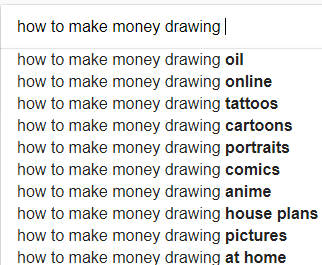
When I first looked at Google’s list, one result stopped me dead in my tracks: “how to make money drawing oil.” Excuse me? Drawing oil? What are we doing here — illustrating petroleum? Summoning medieval potions? Opening an Etsy shop for enchanted motor fluids? Whatever that niche is, it’s clearly meant for wizards, chemists, or people with way too much time on their hands, so I punted that one straight into the abyss.
Since I actually do have an interest in cartooning, I focused on the saner options like “how to make money drawing cartoons” and “how to make money drawing anime.” Now we’re getting somewhere. But I wanted to see how far down this rabbit hole we could go before we hit bedrock — because that’s how you find a niche that isn’t just big, but profitable.
So I typed in “how to make money drawing cartoons.” Boom — over 6 million results. Better. Still broad, but at least we’ve escaped Witchcraft Oil Drawing™.
Keep Refining the Results
To refine things even more, I did what all niche hunters must eventually do: I scrolled. All the way to the bottom of the page. Because that’s where Google hides the good stuff — the related searches, the “Psst, here’s what people actually want” section.
Here are the results from the bottom of the page:

So then I wandered over to “how to make money drawing anime.” That little gem came back with over 8 million results. Eight. Million. Clearly there’s a very serious interest in drawing anime — which makes sense, because half the internet is either watching anime, drawing anime, or arguing about anime plotlines like their life depends on it.
Naturally, I wanted to dig deeper. If people are this obsessed, what exactly are they searching for? So I went back to Google and typed in “drawing anime for…” just to see what fresh madness the autocomplete elves would deliver this time. And once again, Google served up a delightful buffet of suggestions — each one basically screaming, “HEY, THERE’S A MARKET OVER HERE!”
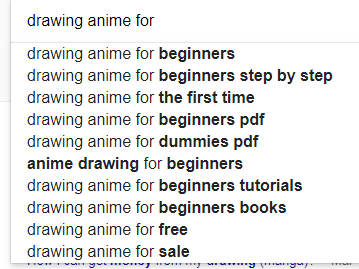
Looks like there is quite a bit of interest in learning how to draw anime. The problem I have with this is you will still wind up with large numbers in your search results. This time I had 23 million results.
Ugh!
This means you’re stepping into a very competitive market. Teaching beginners how to draw anime is like walking into a stadium where ten thousand other people are already waving their hands and yelling, “Pick me! Pick me!” If you’re serious about this niche, you’ll want to drill down even further and see if there are sub-categories hiding underneath — things that are underserved, overlooked, or weirdly profitable.
Step 3: Check Out Other Sources for Brainstorming Ideas
Google isn’t your only crystal ball. Another great place to research your niche is Amazon — because if there’s one company that knows what the world is buying, hoarding, and obsessing over at 2:17 a.m., it’s Amazon.
And Amazon makes it stupidly easy. They’ve got this giant category list sitting on the left side of the screen like, “Hey, wanna see what 12,000 people bought before breakfast?” To use it, just type your topic into the search bar and let Amazon do its autocomplete magic. Then scroll to “Books.” (Yes, books — humanity’s first blog posts.)
In our example, I searched for “drawing,” and suddenly I’m staring at an entire ecosystem of books, subtopics, micro-skills, niche communities, and extremely passionate opinions. This little trick will spark ideas you never would’ve found on Google alone — and a few you’ll wish you could unsee.
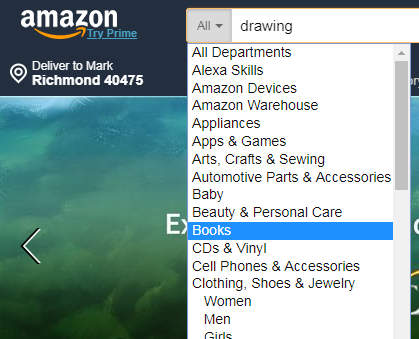
A Simple Hack for Finding Niches
When your Amazon results load, you’ll notice a tidy little category list on the left side of the page — basically Amazon whispering, “Here are all the rabbit holes you can fall into today.” At the top, you’ll also see the total number of results. In this case, there were 50,000 books on drawing. Fifty. Thousand. That’s not a niche; that’s a stadium full of people arguing over pencil brands.
Right under those category results is a sneaky little link that says “view more.” Go ahead and click it. This is where Amazon stops being subtle and starts spilling even more niche possibilities — everything from hyper-specific art techniques to bizarre micro-genres you didn’t know existed but now can’t look away from.
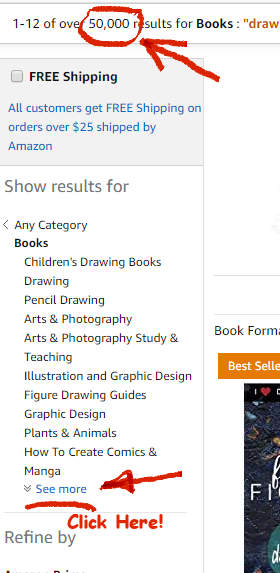
Take a look at all of these different categories in the search term, “drawing” below!

You can click on each of these categories and disappear into an endless universe of books written on every micro-topic imaginable. Seriously — if I went into all that detail here, this “long post” would turn into a very, VERY long post, and neither of us has the emotional stamina for that today.
Brainstorming Magic
But this little Amazon trick? It’s pure brainstorming magic.
It helps you see what topics exist, which ones are thriving, and what kind of culture surrounds the niche you’re considering. You start to notice patterns, obsessions, gaps, and those weirdly passionate communities you didn’t know existed but instantly understand.
Pro Tip: When you find a book or product in your niche, check out the top sellers and read the customer reviews. Those reviews are a goldmine — free market research served on a silver platter by strangers on the internet who will tell you exactly what they love, hate, wish existed, and can’t live without. That insight? Chef’s kiss. Use it.
Step 4: List the Pros and Cons
Now comes the part where you sit down with your niche and have “the talk.” You know — the pros and cons conversation where you figure out whether this niche is a soulmate or the kind of rebound idea you’ll regret by Tuesday.
All you need is a simple list based on the research you’ve done so far. Let’s use our example niche:
Niche: Teaching Anime for Beginners
Pros:
-
- Huge, hyper-active fanbase
- Fun, lively topic (you’ll never be bored)
- Tons of potential affiliate products — tablets, software, books, merch
- You can actually make money teaching this stuff
Cons:
- Fierce competition — everyone and their cat is teaching anime online
- Approximately three million free tutorials already exist
- Audience is mostly teens… and teens aren’t exactly rolling in disposable income
- Most products are inexpensive books = small commissions
- To make serious money, you’d have to sell enough units to fill a small warehouse
Important Considerations:
In this anime-teaching niche, your audience is mostly preteens, teens, and maybe early twenty-somethings who still think $12 is “a lot.” These aren’t your big spenders. And that’s just one of the many things you have to weigh when picking a niche for blogging for money.
Here are three things to think about when choosing a money-making niche:
Consideration #1 – Price Per Item
You must think about the average price of the items you’ll promote. You want a niche where you can sell or recommend products over $100, because you need at least $20 in profit per sale for this whole blogging-for-income thing to be worth your time.
Let’s do the math:
Question:
If you sell 20 widgets at $15 each, versus 20 widgets at $200 each… which one makes you richer faster?
Answer:
Duh. The $200 item. Anything bringing in less than $20 per sale means you’ll have to sling product like a caffeinated flea market vendor just to keep the lights on.
Consideration #2 – How Wealthy Is Your Target Market?
Here’s a fun little truth bomb:
If you want to make good money online, target people who have money. Ideally, folks earning in the $80,000 to $100,000 range. Why? Because these people spend online like it’s an Olympic sport — and they don’t agonize over every $29 ebook or $97 mini-course.
They see something they want, click “Buy Now,” and boom — someone’s Stripe account gets happier.
Contrast that with our anime niche example. Your audience here is mostly kids and teenagers who don’t have credit cards, don’t have debit cards, and don’t have the legal right to buy anything without a parent stepping in and saying, “Fine, but only one.” They’re not impulse buyers — they’re permission-requesters.
Compare that to a mom who wants a high-end cookware set, or a dad who’s eyeing the latest $2,000 laptop. Those folks already have PayPal accounts, credit cards, Amazon Prime, and zero hesitation. They know how to buy things online, often, and confidently. And they’re the ones who make bloggers money.
Consideration #3 – Operate in a Niche Where You Can Make Money in Multiple Ways
If you want to survive in the wild jungle of online income, choose a niche where you can make money from more than one angle. The absolute best products to sell are the ones you create yourself — because you control the pricing, the branding, the profit, everything. Second-best are high-commission affiliate products. Notice I said high commission. Not the “here’s 89 cents, champ” kind.
What you don’t want is a niche where people are obsessed with big-name brands like Nike, Rolex, or anything else that requires you to sell a kidney just to become an approved vendor. Sure, those products sell like crazy — but unless you’re the actual manufacturer or a giant retailer, you’ll never touch the real money.
Software programs are the one exception. You can make a little money selling them as an affiliate, but the real treasure?
Creating courses that teach people how to use that software.
That’s where the real cheddar lives.
An Example of My Own Course
For example: I love graphic arts programs, and I sell courses on how to use them. One of my favorites is PaintShop Pro by Corel. I even created a course called PaintShop Pro Tricks and Basics Made Easy — a video course that walks people through the entire program step by step.
Here’s the fun part: I can get a full physical DVD version made — color case, screen-printed disc, insert, shrink wrap, the whole shebang — for around $2.00 each. Add $4.00 for shipping, and I’m out $6.00 total on each unit.
And I sell them on Amazon for about $28.00.
That means I pocket roughly $26.00 profit per sale.
See the difference? When it’s your product, you’re not fighting for scraps — you’re eating steak.
Explore Ways to Make Money with Your Blog
At this point, you’re probably wondering, “Okay, great… but what the heck am I supposed to sell to actually make money with this blog?” Excellent question, my curious friend — because when you’re blogging for money, the number of ways to monetize your content is so huge it could make your head spin like a carnival ride.
There are countless ways to make money with a blog. And I do mean countless. If I tried to list every single method, this post would turn into a 400-page encyclopedia, and neither of us signed up for that kind of punishment today.
So instead, I’m giving you a clean, sanity-saving overview. I’ll break things into major business categories and then show you the different ways you can profit within each one. This will give you a nice aerial view of the landscape without drowning in the weeds.
All right — sleeves up, coffee sipped, let’s dive in.
Category 1: Products
When it comes to making money with your blog, “products” split into two big families:
- Virtual products – stuff that lives on a computer
- Physical products – stuff you can bonk someone on the head with
Let’s break them down.
Virtual Products
Apps
Apps are software tools that run on your phone, laptop, tablet, fridge, or whatever else has a screen these days.
There are three ways to make money with apps:
- Create your own app and sell it through your blog.
No, you don’t have to code it yourself — that’s what app developers are for.
Offer a free trial or “lite” version to hook people, then charge for the full one. - Promote apps made by other people.
You don’t sell them directly — you run ads or include links. When someone buys through your link, the host company tosses you a commission. - Give an app away for free… on purpose.
Why? Branding.
Example: A carpet cleaning business gives away a free “carpet cost calculator” app. Every time someone uses it, they see your business name. Free marketing, baby.
Printables
Printables are digital files people download and… wait for it… print.
These can be:
- Coloring books
- Patterns
- Sewing templates
- Checklists
- Spreadsheets
- Crafting designs
The crafting world loves printables and spends real money on them — often without blinking.
Reports
Reports are short, focused documents you can:
- Give away as a freebie
- Sell for a small price
They’re fast to create and great for niche audiences. Think laser-targeted problem solving.
Software
Making money with software comes in two flavors:
The slow, expensive way:
Create your own software.
You need:
- A concept
- A developer
- A budget large enough to make you sweat
The fast, cheap way:
Become a software affiliate.
Write reviews, include your special link, and when people buy: Cha-Ching!
Great for beginners because you can start immediately.
Courses
Courses are the online money printer of the modern internet.
By 2023, the course market was projected to exceed $240 billion — and it’s still skyrocketing. Creating a course isn’t “hard,” but it is time-consuming:
- Planning
- Outlining
- Recording
- Creating visuals
- Editing
But the payoff? Very worth it. One good course can fund your caffeine habit for life.
eBooks
eBooks are digital books you can use in two ways:
- Lead magnet – give away a valuable eBook to grow your email list.
- Paid product – write an eBook, list it on Amazon or your site, and make money.
I give away my 200+ page eBook, Blog Profiting Secrets, as a freebie — but if you hate free things, you can go buy it on Amazon instead.
Bonus: Publishing an eBook makes you look like an expert, even if your dog still judges you.
Physical Products
Merchandise
This category is huge — like “I could write an entire encyclopedia about it” huge.
Two ways to sell physical products:
The Easy Way: Affiliate Merchandise
Become an Amazon affiliate, write reviews, recommend products, and include your affiliate link.
The customer clicks → Amazon ships → you get paid.
You don’t touch a single box, which is excellent because packing tape is a menace.
The Hard Way: Selling Your Own Inventory
This path involves:
- Buying from a wholesaler
- Storing the products
- Shipping the products
- Praying none of them break in transit
The main site for this is Alibaba, where you can buy anything from water bottles to unbranded electronics to 20,000 rubber chickens (yes, really).
Using this method (buying wholesale from import sites), you order products directly from suppliers, store them in your home or workspace, and then sell them at whatever retail price your entrepreneurial heart desires. Since you’re buying at wholesale pricing, your profit margins can be solid… IF you’ve done your homework.
You’ve got to research the products, understand your niche, and make sure what you’re selling actually aligns with the focus of your blog. No one wants to be “that blogger” who writes about vegan cooking but sells tactical flashlights.
Teaching Material and Courses
Let’s talk about a legend for a second: Dan Kennedy. The man is the undisputed king of physical information products. He’s famous for selling insanely valuable marketing courses as physical items delivered right to your door — old-school style.
One of his biggest hits is Magnetic Marketing.
Here’s the wild part: it doesn’t cost Dan much to produce these kits. Many of them are literally a 3-ring binder filled with printed pages.
Cost to produce? Under $10.
Price he sells it for? Over $300.
Profit margin? Somewhere between “holy moly” and “I need to sit down.”
And before anyone screams “scam,” no — the content is legendary, the results are real, and customers happily pay for it because it works. That’s the power of a well-built, high-value physical course.
And here’s why physical info products are magical:
-
They’re cheap to produce.
You can print them yourself or use print-on-demand.
-
You only make what you need.
If 10 people buy, you print 10 copies. You’re not stuck with 500 binders sitting in your garage next to your holiday decorations.
-
Fulfillment services make your life easy.
Many companies will:
- Take the order
- Print the product
- Package it
- Ship it
- And handle customer service
…while you sit back and check your Stripe notifications.
You can also make money by creating audio courses on CD or video courses on DVD and selling them online. I do this all the time, and I learned the entire process from the course Make Your Own Video and Audio Courses — an absolute lifesaver for getting physical media created without losing your mind.
Category 2: Services
Selling services through your blog can be an absolute money machine. If you’re skilled at literally anything, there’s a very good chance someone out there will gladly pay you for it. Your blog becomes your storefront, your marketing engine, and your authority builder — all at once.
Here’s an overview of popular service categories you can offer through a blog.
Coaching & Training
This model is perfect for people who love teaching, mentoring, motivating, and nudging others toward progress. Your blog acts as your content hub — you share value, build authority, and connect with the exact people who need your help. From there, you can deliver training, host sessions, create programs, or run group workshops without ever leaving your laptop.
Freelancing
If you have a marketable skill, freelancing is a fast way to turn your blog into a client-attracting machine. Your posts become bait — value-packed content that answers the questions prospects are already Googling. This helps you establish authority, credibility, and trust.
But fair warning: freelancing isn’t “write one blog post and watch the clients flood in.” You still need networking, outreach, and smart marketing. Your blog is simply one of the best foundations you can build.
Writing
This technically fits under freelancing, but writing is so massive it deserves its own spotlight. I’m a freelance copywriter and blogger myself, so trust me — writing services are everywhere.
You can write:
- Blog posts
- Sales copy
- Email sequences
- Website content
- Reports
- Articles
- Landing pages
If it uses words, someone will pay someone to write it.
Pro Tip:
Guest blogging is one of the fastest ways I grew my freelance career. Thousands of blog owners are desperate for competent writers. Most of the submissions they receive… well… let’s just say they aren’t exactly Pulitzer contenders. If you present yourself as a real professional, you instantly stand out.
Yes, you’ll need to deliver quality work and keep editors updated — but the authority, exposure, and inbound clients you gain make it worth every keystroke.
Designing
Design isn’t just about making things “pretty.” It’s an enormous category that includes:
- Graphics
- Logos
- Website design
- Animation
- Storyboards
- Product demos
- Video intros
- Whiteboard animation
Whiteboard animation alone is a huge niche — and many of those scripts are written by copywriters. (Ask me how I know.)
Even architectural or interior design professionals can now serve clients online with the right tools.
Consulting
If you have expertise — real expertise — you can package it as consulting. Your blog shows people you know your stuff, and a simple scheduling plugin allows prospects to book sessions.
Consulting is powerful because it scales to teams. With tools like Zoom or Google Meet, you can:
- Coach groups
- Present strategies
- Share documents
- Review plans
- Collaborate in real time
And you can do it all from your kitchen table with pajama bottoms on. Truly, a modern miracle.
Category 3: Advertising
Advertising is one of the most direct (and often easiest) ways to make money with your blog. But there’s a catch — you have to use ads wisely. Readers hate going to a site that looks like Times Square at midnight. If you study your niche and competitors, you can find the right balance that lets you monetize without making your site look like a carnival.
Ad Networks
The most popular example is Google AdSense — and it’s the first ad system I ever used. Once you’re approved, Google gives you a simple snippet of code to drop into your blog.
If you’re using WordPress, there are AdSense plugins that handle this for you. Blogger even comes with an AdSense gadget built in.
The beauty of ad networks is that they automatically place ads relevant to your site’s content. When someone clicks an ad, you make money.
Sponsored Posts & Sponsored Social Content
Sponsored posts are blog articles that you either write for someone else or that someone pays you to publish on your site.
You can:
- Pay to guest post on another blog, or
- Get paid for allowing sponsored content on your own site
Once your blog gains traction, brands will approach you for exposure.
Site-Wide Sponsorships
This is where companies pay you to place their ads across your blog — usually in the sidebar, header, or footer.
You won’t get these deals until your site becomes popular in your niche, but once it does, site-wide sponsorships can bring in solid income.
Job Boards
If your blog targets a specific niche, you can add a job board and monetize it in several ways:
- Selling your own products
- Offering consulting services
- Running ads on the job board
- Earning commissions for job placements
Specialized job boards become valuable once your site becomes known as an industry hub.
Newsletters & Ezines
If you’re blogging for money and not collecting email addresses… friend-o, you’re missing the boat.
Once you have a list, you can turn your emails into a digital newsletter and place ads inside them just like you would on a blog. When readers click a link or purchase a recommended product, you make money. You can also sell your own services or offer sponsorship spots inside the newsletter.
Video Ads
Using services like Viboom, you can place ads in the form of videos on your site. Someone creates the video, you embed it on your blog, and every time a visitor hits “Play,” you get paid.
RSS Ads
RSS feeds allow readers to subscribe to your site and get notified of new posts. When they click through to your content and interact with ads (like AdSense), you earn a commission.
Directories
Some bloggers create pages that look like valuable resource lists — and they are — but they’re also monetization machines.
You can place ads on these directory pages, and once your site becomes the go-to resource in your niche, you can even start charging for listings.
Text Links
Text links are one of the simplest passive income strategies. You sign up with a company, get a special link containing your tracking code, and add it to your content. If someone clicks and buys, you get paid.
This works great with Amazon affiliate links and similar programs.
Podcast Ads
Podcasts offer several monetization opportunities. You can place ads on your podcast’s webpage, promote your own products and services, or run sponsorships inside the episodes themselves.
Contests & Giveaways
This is one of the most effective ways to build your email list.
You offer a valuable prize, people sign up or share your post to enter, and once they’re on your list, you can send offers for your products, services, and affiliate recommendations.
Category 4: Affiliate Marketing
Affiliate marketing is one of the most popular ways to make money with your blog — and for good reason. You recommend products, your readers buy them, and you get paid a commission. It’s simple, scalable, and doesn’t require you to create everything yourself.
Shopping Sites
I’ve been involved with Amazon’s affiliate program for almost a decade now, and there’s a reason it’s so widely used: it’s insanely easy. You can set it up in about 15 minutes, and once approved, you can choose from millions of products to promote. When someone buys through your link, you earn a commission.
There are plenty of other shopping sites with similar programs. The key is to choose affiliate products that fit your niche. If you’re blogging for money in a focused area, promote items your audience actually wants — not random gadgets that don’t relate to your content.
Affiliate Networks
Affiliate networks are platforms that bring together tons of merchants and sellers under one roof. My personal favorite is ClickBank.
Let’s say you’ve created a course or eBook on how to make $2,000 a month with YouTube videos. You want to sell as many copies as humanly possible, so you upload it to an affiliate network. Why? Because these networks attract hungry affiliate marketers who are actively looking for products to promote.
On the seller side, you get access to a massive pool of affiliates ready to earn commissions by selling your product. On the affiliate side, you can browse through endless products and choose which ones you want to promote — often based on the commission rate, popularity, or how well the product fits your audience.
Affiliate networks are a win-win marketplace for both creators and promoters.
Private Affiliates
Some creators skip the networks entirely and recruit affiliates directly. These are known as private affiliates — individuals who promote your products without being connected to a large platform.
As a copywriter, I personally promote Bob Bly’s courses and eBooks because they’re high-quality and perfectly aligned with my writing niche. Private affiliate partnerships like this are powerful because you’re working with products you genuinely believe in — and your audience can tell.
Category 5: Recurring Revenue Streams
Recurring revenue is the holy grail of blogging income — the money that keeps rolling in every month like a subscription.
This is the “big prize” for many bloggers and online entrepreneurs because prospects stick around long-term, giving you steady, predictable income.
Forums / Private Communities
One of the biggest online forums I still visit is the Warrior Forum — a massive gathering place for online entrepreneurs. Private forums can be incredibly profitable because members pay for ongoing access to your community, expertise, and discussions.
However, starting and maintaining a forum isn’t easy.
I ran one years ago for Photoshop users, and getting new members wasn’t the hardest part — keeping the place clean was. Spammers poured in daily trying to sell garbage or post inappropriate content.
Moderation was constant, and forum maintenance quickly became a full-time job. It’s a viable revenue stream but not for the faint of heart.
Premium Content
Premium content is where you offer something deeper, more advanced, or more exclusive than what you put on your public blog. This might include specialized training, advanced tutorials, insider strategies, or monthly deep-dive content.
The challenge? You must continually create top-tier material in addition to your regular blog posts. Some bloggers also offer offline newsletters — the old-school, physical kind delivered to your mailbox — complete with audio CDs, samples, or exclusive offers available only to subscribers. It’s a throwback model, but it still works remarkably well when done right.
Coaching
Coaching is one of the most popular recurring revenue models among bloggers. I’ve seen every variation imaginable: group coaching programs, membership-style coaching, hybrid offline/online coaching, and classic one-on-one premium coaching.
The hardest part is getting clients in the door. But once you establish yourself as someone who gets real results, opportunities multiply both online and offline.
Coaching can become a reliable, high-ticket recurring revenue stream — and often becomes a core part of a blogger’s business.
Category 6: Events
Your blog can do more than attract readers — it can fill seats. Many entrepreneurs use their blogs to generate excitement for events they later host, either online or in person. If your blog becomes popular, you can stage events that bring in enough revenue to fund your entire year. Yes, really — one well-run event can be that powerful.
Events also give you something money can’t buy: personal connection. If you want to become known in your industry, your audience needs to see you, hear you, and interact with you. Live events build trust, authority, and reputation faster than almost anything else. Anyone can write a blog post — but not everyone can command a room. Hosting events also lets you invite other experts to speak, adding more value for your attendees.
But let’s be honest: staging events is no cakewalk. It takes serious planning — often a year or more — to coordinate venues, speakers, materials, travel, and a parade of unexpected expenses. Events can be lucrative, but they’re also labor-intensive.
Online Workshops and Seminars
Online workshops and seminars are a fantastic alternative to live events, especially if your topic can be taught remotely. They’ve exploded in popularity because so many people are tired of overpriced, slow-moving traditional education. Why pay thousands for a college course in programming when you can learn it online faster, cheaper, and without sitting through a semester of unwanted general education classes?
Online workshops let you teach exactly what students need to know to get results.
No fluff.
Zero filler.
And zippo English Literature 101 – unless your niche happens to be Shakespearean sonnets with AI support.
Conferences
Conferences are similar to workshops but on a larger scale, typically involving multiple speakers and a more structured, multi-day format. They offer huge value but come with their own set of logistical challenges.
You’ll need to:
- Coordinate speakers
- Choose a venue
- Make travel convenient for attendees
- Budget for both expected and unexpected costs
Some conferences take place in exotic locations — like cruise ships or tropical destinations — which is great if you can get your audience there without bankrupting them. For beginners, the smartest move is to host conferences in accessible locations. Once you’ve built a sizable following, feel free to host your dream event in Maui, Bali, or on a yacht shaped like a giant funnel cake. You’ve earned it.
Category 7: Marketing Bricks and Mortar Businesses
A traditional brick-and-mortar business can explode its reach and revenue by using online strategies — and your blog can be the engine that drives all of it. One of the best pieces of marketing advice I ever received came from a millionaire mentor who told me:
“Always, ALWAYS build a list. It is pure gold.”
It still amazes me how many business owners never do this. I once helped a restaurant owner create a website for his catering business. He had been in business for more than 15 years, had great customer loyalty, and had even been featured in a major local newspaper… yet he had no customer list. Not one. He never even thought about it. That meant 15 years of missed opportunities to nurture customers, build loyalty, and expand his business.
This is exactly where a blog becomes a powerhouse tool. With a blog you can:
- Build an email list to market to
- Offer digital coupons
- Allow customers to place orders online
- Advertise special events
- Keep your “herd” updated on what’s happening
- Demonstrate your expertise and become an authority in your field
- Link to social media channels to grow your customer base
- Interact with customers through comments and feedback
As you can see, having a blog that supports your physical business is incredibly valuable. The two most powerful components of this blogging-for-money strategy are building a list and connecting with your customers. The more they know, like, and trust you, the more they will buy from you.
Blogging for Money Resources by Category
Bricks and Mortar Business Courses
- Dan Kennedy’s Lifestyle Liberation
- The Sales Lions
Virtual Product Developers
- Pangara Application Developers
- Xcubelabs
- Toptal Software Developers
Making Money with Printables
- How to Earn Money with Printables
- How I Made $30,000 Selling Printables
Why Offline Businesses Must Build a List
One of the best pieces of advice I ever got came from a millionaire marketer I worked for. He told me:
“No matter what you sell, you MUST build a list. It is pure gold.”
He wasn’t kidding.
It still amazes me how many brick-and-mortar owners have been in business for years and have zero marketing database. No email list. No customer list. Nothing.
Just a cash register full of forgotten names.
The “No List” Restaurant Story
I once helped a restaurant owner design a website for his catering business. He wanted to know how to market his restaurant better.
He had:
- Great food
- Loyal repeat customers
- A good reputation
- A feature in a major local newspaper
He’d been in business 15+ years.
So I asked the magic question:
“Do you have a list of your customers?”
His answer?
No…No list…Never even thought about it.
Fifteen years of serving people, and he had no way to reach them directly. No way to invite them back. No way to turn satisfied customers into raving fans.
That’s the difference a blog and an email list can make.
How a Blog Supports a Local Business
Your blog becomes the hub that connects all the moving parts of your offline business.
With a blog you can:
- Build an email list you can market to
- Offer digital coupons and promotions
- Give customers a way to place orders or inquiries online
- Advertise and explain special events (live music, tastings, classes, sales, etc.)
- Keep your herd informed about what’s happening at your business
- Write posts that show your expertise, turning you into the local authority
- Link to your social media pages and grow your audience even more
- Talk to your customers in the comments and hear what they want
You’re not just “blogging for traffic” — you’re building relationships with real people who already like what you do.
The Real Goal: List + Relationship
When you’re blogging for money in a bricks-and-mortar world, the two most important goals are:
- Build a list.
- Stay connected to that list.
The more your customers:
- Know you
- Like you
- Trust you
…the more often they’ll choose your business over everyone else.
Your blog gives you a place to tell stories, explain what you do, share behind-the-scenes glimpses, and remind people why they like you in the first place.
That’s not “just content.” That’s long-term customer loyalty.
What is Pillar Content and How Can I Use It?
Part 1: Choose Your Topic
In this particular post, I wanted to write what is known as “pillar content”. In other words, I wanted to write a definitive guide on starting a blog. So, this post is a rather massive one.
If you’re just starting out, you’ll want to write posts that are in the 1500 to 3000-word range. You should focus only on one particular problem your readers are concerned about.
Why?
If you’re new, you want people and search engines to refer to you as the go-to-person in your niche. So targeting topics that people are very concerned about is important.
90% of the readers out there are looking for answers to their questions. So, if you can answer them better than anyone else, you’ll have a loyal following. You won’t need to write massive amounts of content.
However, you will need to answer questions better than your competitors.
How to come up with good topics:
Topic Task #1: Carry around a notepad and write down topic ideas as they occur to you. You should even keep one close by when you sleep as great ideas pop into your head when you least expect them.
Topic Task #2: Once you have a batch of ideas head on over to BuzzSumo to see if there are any real popular posts similar to yours. I typed in, “Blogging for Money” and here is what I got:
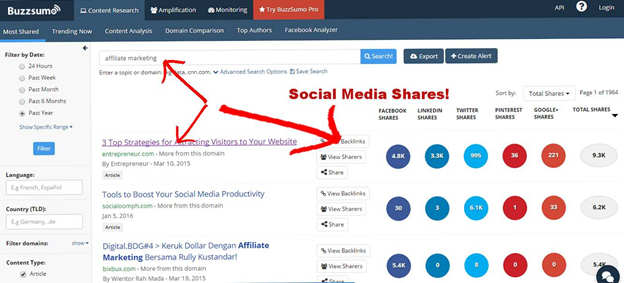
Note: If you’re using the free version of BuzzSumo, don’t click on these links! In the free/trial version of BuzzSumo, you’ll only get a couple of clicks before they block you from any more inquiries.
Just open a new tab and Google the titles presented. You can then read and collect these posts.
As you can see from the above results from Buzzsumo, these posts got quite a few shares on a very similar topic. You will want to read them and place them into a swipe file.
(A swipe file is a collection of similar, successful posts that you can draw ideas from. Successful copywriters use the crap out of them when they craft high-conversion copy for clients. If this tactic works for millionaire copywriters, why shouldn’t you use it too?)
Topic Task #3: Create a swipe file of these posts and place them all into a single .pdf file.
- Go to the post you want to collect
- Highlight everything on the post
- Open a word processing document and paste the post into it
- Collect another 10 to 20 posts using the same steps
- Save the entire document as a .pdf file into a folder for your topic
Another Hack for Getting Free Results
If you happen to run out of free clicks on Buzzsumo, you can go to a similar site called SocialAnimal. It gave me an excellent list of posts I could check out for free.
Topic Task #4: Once you have a good idea of what you want your post to be about, you can then check out similar posts on Google. (In the case of “Blogging for Money”, I Googled those exact words.)
There were quite a few posts written about this subject.
Here are the results Google handed me:
What is Pillar Content and How Can I Use It?
Part 1: Choose Your Topic
For this post, I wanted to create what’s known as pillar content — a definitive, no-stone-unturned guide on how to start a blog. Pillar content is long, deep, and incredibly valuable. And yes, this post turned into a massive beast because of it.
But if you’re just starting out, don’t aim for a 10,000-word monster right away. Begin with posts in the 1,500 to 3,000-word range and focus on solving one specific problem your readers care about.
Why only one problem?
Because when you’re new, you want both readers and search engines to think,
“Hey, this person is the go-to expert in this niche.”
And the fastest way to earn that reputation is to answer important questions better than your competitors.
Truth bomb:
90% of readers are looking for answers.
If you can answer those questions more clearly, more deeply, and more helpfully than anyone else, you’ll build a loyal tribe. You don’t need to flood the internet with content. You just need to produce the best content.
But to do that, you need great topics. Here’s how to find them.
Topic Task #1: Carry a Notepad Everywhere
Write down ideas the moment they hit you.
Keep one in your bag, your car, your kitchen — even beside your bed.
Some of your best topics will show up at random moments when your brain whispers,
“Hey…psst…what about this?”
Capture those ideas. Don’t trust your memory.
Topic Task #2: Use BuzzSumo to Find What’s Popular
Once you’ve collected a batch of ideas, head over to BuzzSumo. Type in your topic — for example, I entered “Blogging for Money.”
BuzzSumo will show you posts that have gotten a lot of shares and traction.
Important Note:
If you’re using the free BuzzSumo trial, do not click on the links they show. You only get a couple of clicks before they lock you out.
Instead:
- Open a new browser tab
- Google the titles BuzzSumo displays
- Visit and read the posts from Google’s results
This way, you can view unlimited posts without burning your free clicks.
Once you spot high-performing posts on your topic, save them. These will become part of your “swipe file.”
A swipe file is a collection of successful content you use for inspiration, structure ideas, and insight.
Top copywriters use swipe files constantly — because they work.
Topic Task #3: Build Your Swipe File as a PDF
Here’s how to create a clean, organized swipe file:
- Open the post you want to save
- Highlight the entire article
- Paste it into a Word or Google Doc
- Repeat this with 10–20 similar high-quality posts
- Save the file as a PDF
- Put it in a folder labeled with your topic
Now you’ve got a personal library of proven content ideas you can reference whenever you write.
And if you run out of free BuzzSumo clicks, don’t stress —
SocialAnimal is another great tool where you can often see results for free.
Topic Task #4: Check What Google Shows for Your Topic
Once you know the direction of your post, search your topic on Google.
In my case, I searched “Blogging for Money.”
Google showed me tons of posts on the subject — everything from short, fluffy articles to in-depth guides.
Here are the results Google handed me:
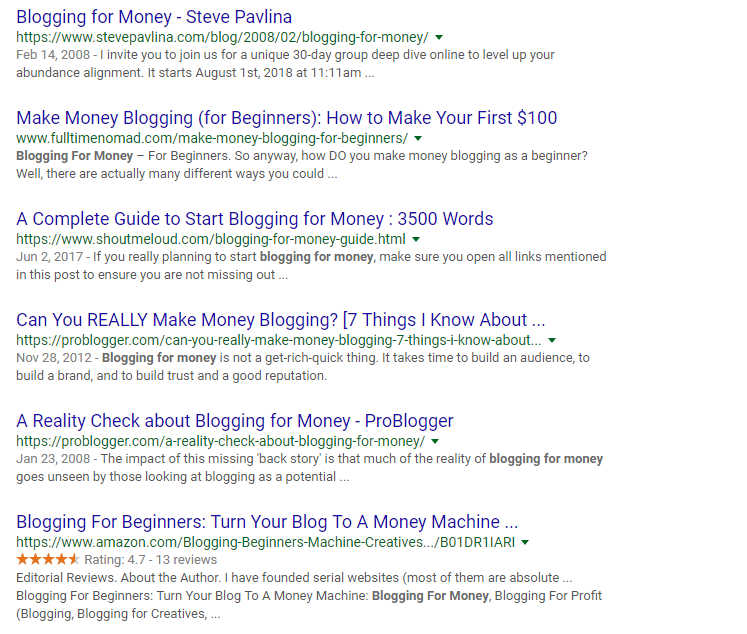
There were a lot of crappy posts using the keyword phrase “Blogging for Money.” And when I say crappy, I mean the kind of posts you read and immediately feel dumber afterward. But mixed in with the fluff were a few heavy hitters — bloggers who clearly know their stuff.
Some of the best examples were:
- Problogger
- ShoutMeLoud
- Blogclarity
Over the years, I’ve learned a simple truth:
When you target a phrase like “Blogging for Money,” you’re going to find a ton of weak content along with a small handful of truly excellent posts. Pay close attention to the excellent ones. Those bloggers have done their research. If they’re using that phrase, it’s because they know it works.
And once you’ve been blogging for a while, you’ll recognize these big-timers instantly. They show up everywhere because they consistently publish content worth reading.
There’s also another way to check the strength of your keywords and phrases.
Let’s head over to Google’s Keyword Planner…
Part 2: Check Out the Keywords
Google’s Keyword Planner is a powerful tool that shows you which keywords and phrases people are actually searching for. If you want to write content that gets traffic, this tool is your new best friend.
Note:
You must have a Google AdWords account to use the Keyword Planner.
The good news? It’s free.
If you already have a Gmail address, you can set it up in just a few minutes.
Once you’re logged in, you can start exploring.
Navigate to the section labeled “Keyword Ideas” and type in your main phrase.
Google will then generate a list of keyword suggestions, along with search volume and competition levels.
Here’s what the screen looks like:
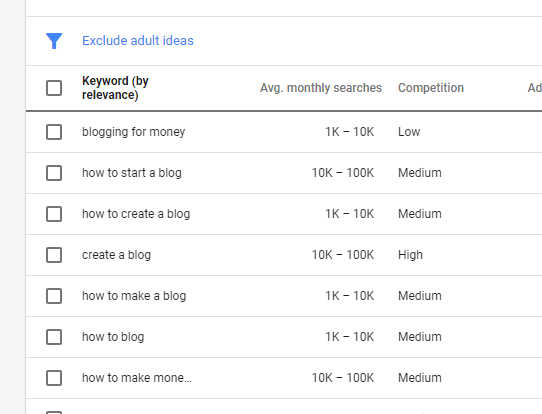
You’ll notice our keyword search turned up some interesting results. The phrase we typed in gets 1,000 to 10,000 searches per month and shows low competition. (Low competition basically means advertisers aren’t fighting over that keyword yet.)
I love seeing this combination — solid search volume and low competition. And the fact that big players in the blogging world are already using this phrase? That’s a strong signal you’re on the right track.
Step 3: Use Your Swipe File
Remember that swipe file I told you to create earlier? Now it’s time to put it to work. If you’ve found even more high-quality posts using your target phrase, go ahead and add those too.
Once your swipe file looks hefty enough, start reading through every article you saved. Yep — all of them. Print them out if you have to. Grab a highlighter and mark:
- Points that are important
- Ideas you want to expand on
- Gaps where you can add more value
Keep all these marked-up pages organized and within reach. You’ll be using them throughout your writing process.
Step 4: Write Out 50 Headlines
Most copywriters and bloggers will agree that your headline is the single most important part of your post. Why? Because the headline decides whether someone reads the first sentence… or clicks away forever.
If you make headline writing a habit, you’ll be lightyears ahead of most bloggers.
Before the internet, magazine ads had only seconds to hook readers. Online, you have even less time — more like three seconds or less. That means your headline must deliver a clear benefit fast.
Here are a few more reasons why great headlines matter:
- When people read RSS feeds, they only see your headline
- Search engine results are scanned, not read
- Many aggregator sites only publish headlines
- Readers need to see how your post benefits them instantly
The Procedure for Writing Compelling Headlines
Based on what I’ve just told you, I’m sure you can see the importance of attention-grabbing headlines.
One of the most popular headline-writing methods comes from legendary copywriter Michael Masterson (real name: Mark Ford). He created a formula known as the “4 U’s.”
The 4 U’s stand for:
Urgent
You want your readers to feel like they must read this information right now. If you can make them feel like they’ll miss out by not clicking immediately, you’re halfway there.
Example of urgency:
“The Tax Laws Change on Jan. 15th — Are You Ready?”
Ultra-Specific
Great headlines speak to a very specific group of people. The more precisely you can target a reader’s problem, the more likely they are to keep reading.
Example of ultra-specificity:
“55 New Software Tools for Professional Accountants”
Useful
A useful headline tells readers exactly why the post benefits them. Many bloggers send surveys to their audience to discover what problems they need solved. Once you know that, crafting useful content is easy.
Example of usefulness:
“How to Write a Book Proposal in 15 Minutes or Less”
(The usefulness here = saving time.)
Unique
Gary Halbert — the prince of print and one of the greatest copywriters ever — wrote some of the most unique headlines on the planet. If you don’t have one of his books on your shelf, you’re not serious about copywriting.
Here’s one of his classics:
The Amazing “Magic Mud” Used
By A Top TV Doctor Who
Doesn’t Believe In Plastic Surgery
Another headline master, the great Bob Bly, also uses the 4 U’s. He even suggests grading your headline on a scale of 1–4 for each U (1 = weak, 4 = strongest).
Don’t worry — you’ll rarely hit 4’s in every category. You might get a 4 in “Unique” but only a 2 in “Urgent.” That’s fine. Aim for at least a 2 in each category, with higher scores wherever possible.
The Simple Formula for Blog Post Headlines
Even though the “4 U’s” are the gold standard, writing for the web comes with its own challenges. People online have the attention span of a caffeinated squirrel, so shorter headlines often win.
When I write blog post headlines, I use another formula I call The 5 S’s:
Stands on Its Own
Your headline will appear as a standalone item on RSS feeds, social sites, archives, and lists. Readers must understand what the post is about without seeing the rest of the content.
Short
Ideally 5 words or less.
(Yes, this is hard. No, you won’t always nail it.)
Starts With Keywords
Lead with words people are searching for. Google loves this, and readers do too.
Summarizes
Your headline should quickly communicate what the post covers — think of it like a mini-elevator pitch.
Sure
Readers should instantly know exactly what they’ll get when they click. No trickery. No bait-and-switch.
You can grade the 5 S’s using Bob Bly’s method as well. Over time, you’ll develop your own personal system for writing strong headlines.
Hot Tip:
If you get stuck writing headlines, expert blogger Jon Morrow offers a fantastic free resource called Headline Hacks. It’s a swipe file filled with proven high-impact headline formulas. You can easily take one idea from his list and generate ten variations for your own post.
Another Hot Tip:
Need fast headline ideas?
Go to Google and run your topic through the Images tab. You’ll see tons of graphics, thumbnails, and quote cards featuring headline-style phrasing. It’s a quick, surprisingly effective way to spark ideas.

Once you’re into the images tab, you’ll want to run a search of magazines related to your niche. I frequently write for motivational and entrepreneurial blogs so I’ll do a google search on Success Magazine.
You want to look at the covers of these magazines.
The covers of these magazines are written by seasoned copywriters who know exactly how hard it is to grab someone’s attention — especially when that person is standing in a grocery store checkout line, half-distracted, bored, and wondering if they should buy gum.
Because of that, magazine cover writers take extreme care crafting the headlines you see. Every word is intentional. Every phrase is engineered for maximum curiosity, desire, and emotional pull.
Take a look at the headline ideas on the magazine cover above.
You could easily grab some of those concepts and tweak them for your own blog posts.
For example, if you run a success or motivational blog, a headline like:
“8 Ways to Live a More Joyful Life”
could quickly become:
- “8 Ways to Live a Rock Star Life”
- “8 Ways to Live a More Powerful and Fulfilling Life”
- “8 Ways to Reset Your Mind and Rewrite Your Future”
Small shifts.
Big impact.
Endless possibilities.
Step 5: Create an Intro That’s Mind-Blowing
Once you have someone’s attention, you don’t want to lose it. Just like your headline, your introduction must grab your reader and lock them onto your post.
The reason I know these tactics work is because copywriters have been using them since antiquity. They’ve stood the test of time because humans haven’t changed — we still respond to the same emotional triggers.
There are two main ways to write a powerful blog post intro.
Blog Post Intro #1: Pain and Pleasure
The “Pain and Pleasure” intro has four sections, each designed to pull the reader deeper into your content.
Section 1: The Grabber
This is the very first line of your post — and it has to hit hard. Just like a headline, it must grab attention instantly because you only have seconds before the reader bounces.
Section 2: Call Out the Problem
Here you identify exactly what’s bothering your reader. If someone has been searching the internet for answers and they see their problem reflected in your intro, they will feel compelled to keep reading.
Section 3: Hint at the Solution
This is where you tease the answer. Keep it short. Keep it light. Don’t serve the steak — just let them smell it sizzling on the grill.
Section 4: Your Promise
Now you tell your reader that if they stick with you, you’re going to deliver the exact solution they’ve been searching for. I often go further and tell them there’s a bonus waiting for them at the end.
It keeps them reading.
It keeps them engaged.
And it sets their expectations perfectly.
Here’s an example of a post I wrote for the motivational site Warrior Wealth Solutions:
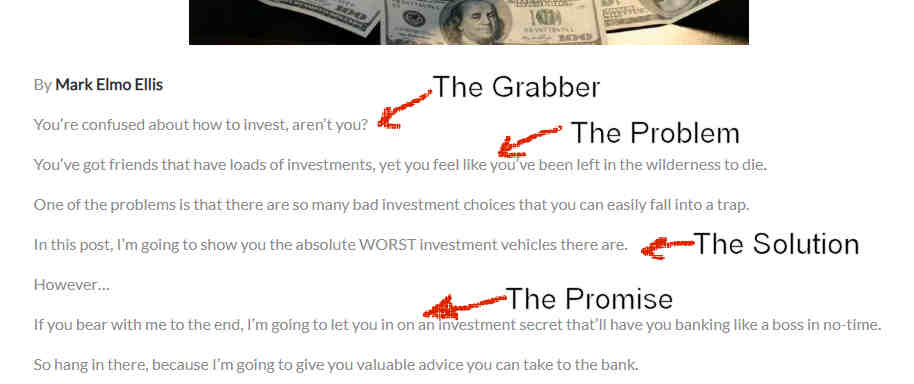
Blog Post Intro #2 – The Transition
There are 3 sections to the Transition method.
Blog Post Intro #2: The Transition Method
This method is a little faster and a little cleaner than the Pain and Pleasure intro. You still hook your reader, but you move them into the main idea with fewer steps. It’s perfect for posts where you want to get to the point quickly without losing emotional punch.
Section 1: The Grabber
Just like before, you must catch your reader’s attention immediately. The difference here is that your Grabber should be shorter and sharper than in the Pain and Pleasure intro. Think of it like snapping your fingers in front of someone’s face — quick, direct, impossible to ignore.
Section 2: The Transition
This is your bridge — the smooth glide from the Grabber into what the post is truly about. In this section, you signal to the reader that you understand their problem and you’re about to solve it. It gently guides them to the heart of the post without feeling forced or salesy.
Section 3: The Main Idea
In one crisp, simple sentence, tell your reader what they’re going to learn or gain. This is where you answer the unspoken question:
“Why should I keep reading?”
Make it clear.
Here’s another example:
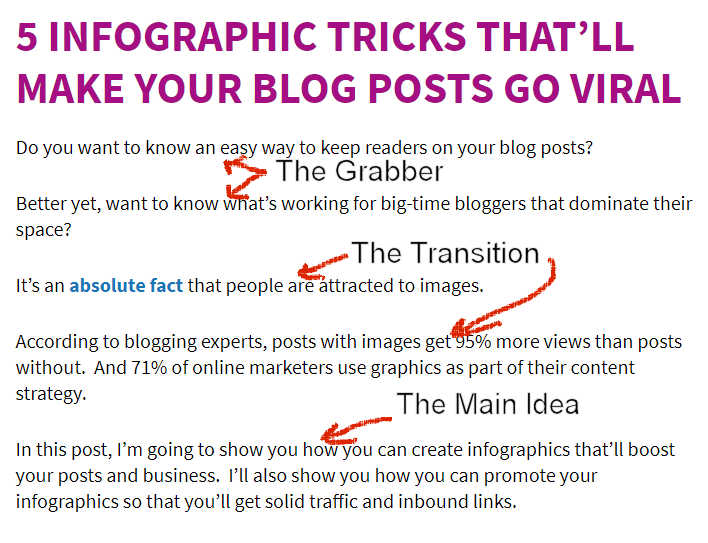
You may notice a few things about this Transition intro.
First, I opened with a question to immediately engage the reader. Questions pull people in because they activate curiosity — and curiosity is one of the strongest psychological hooks you can use. It’s a simple but highly effective way to involve your reader right from the jump.
Then I moved quickly into the transition phase by making a bold statement. After that, I backed up the statement with a link to supporting evidence. This adds authority and shows the reader that what you’re saying isn’t fluff — it’s backed by facts they can check for themselves.
Finally, I told the reader exactly what they’ll get by reading the post. No mystery. No guesswork. Just a clear promise of value.
So now you’ve got two powerful introduction methods that will help your readers move their eyes down the page and actually keep reading.
Are these the only two intros in existence? Probably not.
But you can adapt these two styles to work with almost any blog post you’ll ever write.
Step 6: Write the Main Body
Now we’re down to the point where you’re going to deliver the actual meat of your message.
The most important rule?
Always put your reader first.
Whatever promise you made in your headline or introduction — you must deliver it here. This is where trust is built (or destroyed).
As you write, keep a vivid picture of your ideal reader in your mind. Your job is to make sure they understand everything you’re saying, see the value clearly, and feel like the post was written specifically for them.
Here are some key considerations:
- Will your reader understand the terminology you’re using?
Avoid jargon unless your audience uses it daily. - Are you mentioning places, tools, or concepts your reader may not recognize?
If so, explain them simply. - Will they relate to your tone and language?
Match your writing style to your audience’s world. - Are you presenting your information in a clear, point-by-point format?
This makes your content easier to understand and digest. - Are your sections broken into concise chunks with subheadings?
Walls of text scare readers away; structure pulls them in.
In other words: clarity, simplicity, organization, and follow-through.
Across the Table Writing – Use It to Connect
One of the most powerful writing techniques I’ve ever used is something copywriters call “across the table” writing. It’s an old-school method, but it’s pure gold for creating connection, trust, and readability.
The idea is simple:
Imagine you’re sitting in a coffee shop, across the table from one person — your ideal reader.
You’re leaning in, coffee in hand, explaining something important to them in a friendly, human way.
- No lecturing.
- No stiff academic tone.
- No corporate robot voice.
Just a real conversation.
When you write as if you’re speaking directly to one person — not a crowd — your readers feel like you get them. They feel seen, understood, and guided… not talked at.
This is how you create writing people come back for — and how you make sure your message hits home.

Would you try to sound scientific and use long-winded words and overly complex sentences? Of course not. You’d explain things simply, casually, and in a way your reader can absorb instantly.
Note:
If you’re writing a white paper for a chemical company, that’s different. In that case, you must use formal language, industry terminology, and whatever structure that company requires.
But writing a blog post is nothing like that. Blog writing is conversational. You want the reader to feel like they’re sitting across the table from you — talking, listening, nodding along.
You also want to make sure you’re using terminology, tone, and slang your audience actually relates to.
If you’re writing for people over 30 who care about stock options, your approach will be completely different than if you’re writing for teenagers who want to learn how to skateboard.
For example:
- In financial terms, a bank is where you store your money.
- In skateboarding terms, a bank is a ramp used for tricks.
Two totally different worlds. Same word.
Consider These 2 Factors
You also need to consider the country and culture you’re speaking to. When you get this wrong, things can go off the rails fast.
Take a look at what happens when you get this wrong:
If you know your niche inside and out, you’ll naturally know how to talk to your audience.
Think about it: people buy into what you’re saying much faster when they feel like they know you and like you. That’s why your email inbox is jammed with messages from big-name entrepreneurs — they’re constantly working to build that sense of familiarity and trust.
For example, take a look at some of the emails I regularly get from mega-entrepreneur Dan Lok:
They know that if they speak your lingo, talk to you like a friend, and show up in your inbox regularly, you’re far more likely to buy what they’re promoting. Familiarity builds trust — and trust opens wallets.
The biggest thing to remember about writing blog posts or advertising copy is this:
It’s not about you. It’s about your readers.
You must write in their language, about their problems, using examples they understand. The more your writing serves them, the stronger your connection becomes.
A solid rule of thumb is to give your readers as much help, value, and benefit as you possibly can. As you write the main sections of your posts or copy, ask yourself:
- Will my readers understand what I’ve written?
- Are they persuaded to take some kind of action after reading this?
- Does my writing improve their life in some way?
- Will they understand the slang, tone, or language I’m using?
- Have I added a clear benefit they can walk away with?
Break Your Writing Down
To keep your readers interested, you must break your writing into sections. (Once again, this is an old copywriter’s technique — and it still works.)
That’s where subheads come in.
Subheads are the bold, short titles you place throughout your post to break up your information and guide the reader through your content. There’s nothing more intimidating than landing on a blog post that’s just one massive, unbroken wall of text. That’s the fastest way to lose a reader.
Legendary copywriter Eugene Schwartz had a brilliant way of describing subheads. He called them “mini power stations” — little bursts of energy that keep your audience moving from one section of your copy to the next.
Magazines like Reader’s Digest have used subheads for decades for this exact reason. They help readers skim, scan, and stay engaged — even in longer articles.
Here is a great example of effective subhead use from one of their popular articles:
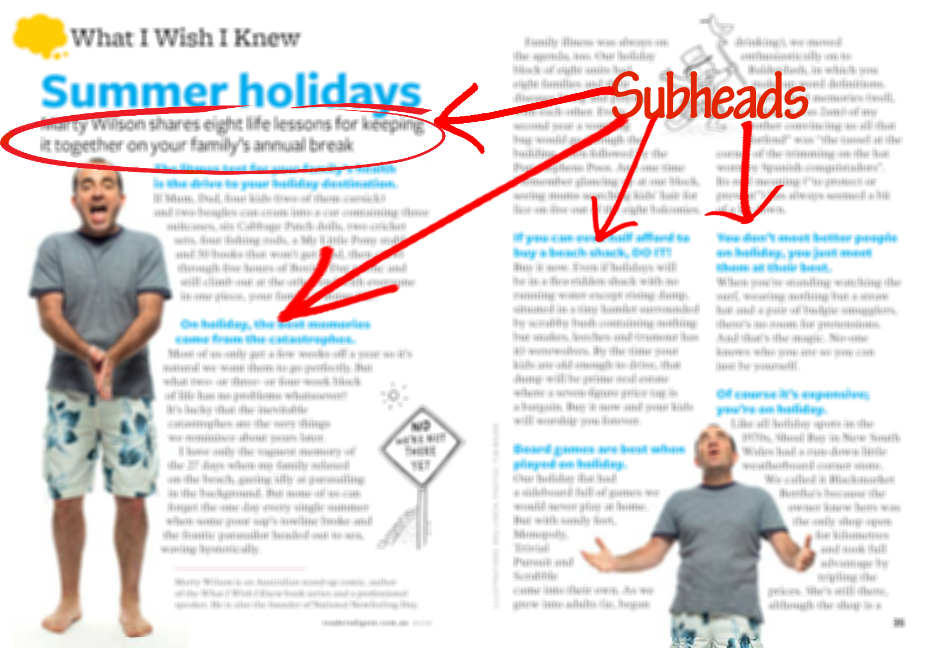
Write As If Your Life Depends on It
When writing sentences, you need to keep them as short and simple as possible. You will also need to make sure that your writing does not exceed an 8th-grade level. Turns out that most people read at that level or below.
This also takes into consideration the fact that most people scan web pages and don’t read them at first. (This is another reason why you’ll want to write great subheads for each section of your post.)
You can check the grade level on Microsoft word if you want to see what level you’re writing at. You can find the exact directions on how to do this on my post on how to keep readers on your page.
Use This Online Tool
I also use an online tool to help me cheat on this, called the Hemingway Editor. This application will automatically show you how to write simple sentences and help you write below an 8th Grade level.
Here are a few things to think about when writing subheads:
- Don’t just label the section with a boring subhead – you’re not trying to just tag the section with an identifier.
- Try not to confuse the reader with a weird headline. I know I told you not to be boring, but don’t go too far off the path of what you’re writing about.
- Don’t tell the reader what’s coming up in the next section – entice them with a teaser heading that’ll make them want to read on.
You should refer to the section above on headlines.
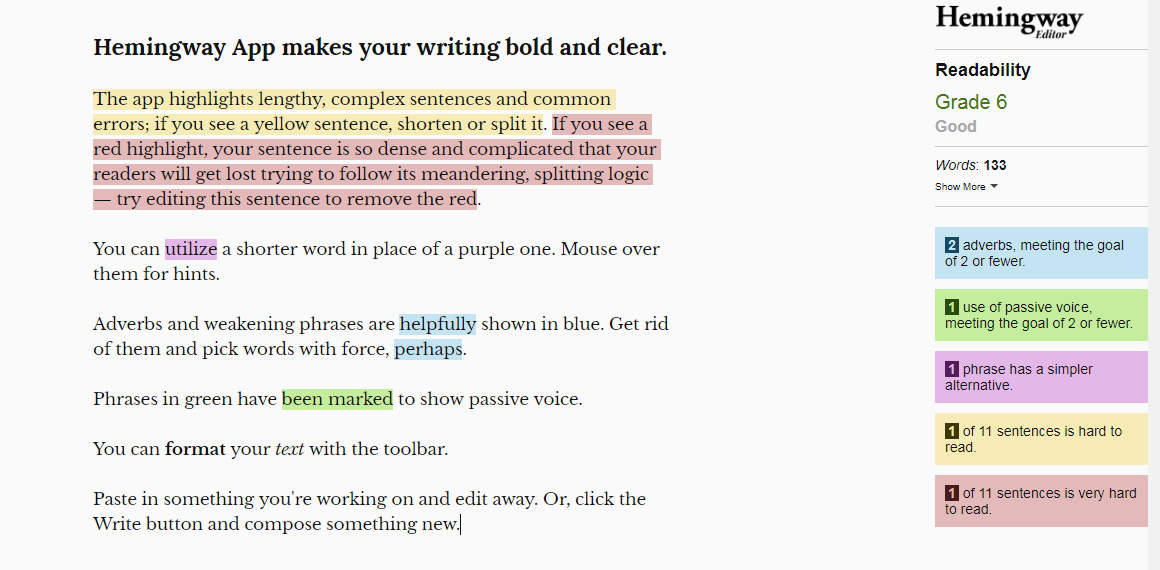
The great thing about this application is that it immediately calls your attention to where you’re making writing errors. It also encourages you to keep your sentences short and sweet, which is exactly what most blog readers prefer.
The downside?
It will probably drive you a little crazy at first.
In the beginning, you’ll feel like you’re rewriting everything. You’ll feel like every sentence needs fixing. And you’ll suddenly become obsessed with finding ways to make your writing shorter and cleaner.
Don’t worry — that feeling fades.
Keep On Using It
After a few weeks of using it, something amazing happens:
Your brain starts to automatically think the way the application does. You’ll notice that your writing becomes clearer, simpler, and easier to read — with far fewer mistakes.
If you look at the image above, you’ll see different colors highlighting your text.
The two colors you need to pay the most attention to are yellow and red.
- Yellow means the sentence is hard to read.
- Red means the sentence is very hard to read.
These are the sentences you should focus on rewriting. I don’t worry too much about passive voice or adverbs. My main concern is clarity and simplicity.
Reading experts like Rudolf Flesch (the same guy whose formulas are used in Microsoft Word’s readability scores) say the average sentence should be around 14–16 words.
Sentences in the 20–25 word range are still okay — but anything longer than that starts becoming difficult for most readers.
Double Check What You’ve Written
Always try to use simple words.
Once you’re finished writing, go back through your work and see if there’s a way to say the same thing more simply.
For example, if you wrote this:
“I employed the device in such a manner as to smack the sharp metal object on the rounded extremity to get it into the oaken mass.”
Try rewriting it like this:
“I used a hammer to nail the board.”
Or you could just say…
Nailed it!

Mix It Up to Keep Eyes on Your Page
You’ll want to use every device in your writing arsenal to keep people engaged. Long blocks of plain text will send readers running for the exit faster than a fire alarm.
The best way to keep your posts visually interesting is to use things like:
- Colorful graphics
- Underlined words
- Italicized words
- Bold letters and words
- Bulleted lists (like these!)
- Parentheses
- Moving GIF graphics
- Videos
- Link sections
- Instructional images
- Centered text
- Colored letters
- Numbered lists
- ALL CAPS
- And combinations of all of the above
Whatever tools you can use to make your posts zing, you should use them — in moderation. The goal is to guide the reader’s eyes, not create visual chaos.
A Checklist for Wannabe Bloggers
Before you hit the Publish button, you need to double-check your work. Here are a few critical questions to run through every time:
Did you deliver what you promised in the headline?
If your headline says “10 Ways to Write Dynamic List Posts,” and your article turns into a discussion about adding graphics, you just lost credibility. Always deliver on your promise — and then over-deliver.
Is what you wrote actually usable?
Can the reader apply it immediately? If you wrote a post on how to get guest posts published, give them actual steps. If they can’t execute what you taught, they won’t believe it works.
Is your writing interesting?
It’s harder than h-e-double-hockey-sticks to keep attention online. Use short stories, real-life examples, or current events to keep your reader emotionally engaged.
Does your post give specifics?
If you write about baking a cheesecake, include the ingredients, baking time, temperatures, and even how to remove it from the pan. Vague content kills trust.
Does your post flow logically?
Don’t jump randomly from one idea to another. Read your post through your reader’s eyes. Can they follow your advice step-by-step in a procedural way and achieve the result you promised?
Does Your Post Have a Call to Action?
This is critical.
Every blog post should have a call to action (CTA) — which is why the next section matters so much.
In traditional copywriting, a CTA is automatic because you’re always asking for a sale. Legendary copywriter Gary Halbert spent enormous amounts of time crafting his CTAs because he knew how easily readers get distracted.
The same rule applies to blogging.
Even if you aren’t selling anything, you must tell your reader to do something.
Here are a few powerful options:
Tell them to join your mailing list.
Remember: the real money is in your list. Make the sign-up form simple and give them a strong reason to subscribe.
Tell them to leave a comment.
Google loves comments because they show engagement and add fresh content to your site. More importantly, comments build community.
Sell them a low-cost product.
Even a $7 product is powerful because once someone becomes a customer, you can market additional offers later.
Offer a free eBook or report.
For my copywriting business, I give away a free branded eBook called “Blog Profiting Secrets.” Even if someone doesn’t want to give me their email, the branding still keeps my name in front of them.
No matter what you offer, make it ridiculously easy to order or download. Every extra step is another exit ramp for your reader.
Make Your Call to Action Irresistible
YOU MUST MAKE YOUR CALL TO ACTION AS IRRESISTIBLE AS POSSIBLE.
This is where knowing copywriting really pays off.
Your reader should feel like:
- They need what you’re offering
- They’ll be missing out if they don’t act
- It’s easy, safe, and worth it
You don’t do this with pressure — you do it with clarity, benefit, and emotion.
Tip:
A great way to learn this skill is by studying email offers. Have you ever received an email that made you want to buy something even when you couldn’t afford it?
That’s not an accident.
That’s excellent copywriting at work.
Step #6: Check Your Work — The Failsafe Method
You must check your work any time you write for the web.
Why?
Because if you’re approaching this at a professional level, your writing needs to be as strong, clean, and mistake-free as possible — especially when you’re publishing articles or guest posts.
Your reputation is on the line.
Thousands of people may read what you’ve written. And if your post is loaded with obvious mistakes? A lot of people will notice. And once they notice, they won’t forget.
How to Check Your Work
So here’s a simple, rock-solid way to double-check your work:
- Print out your writing.
Get your work off the screen and onto paper. A physical copy forces you to slow down and see mistakes your eyes glide right over online. - Use a ruler and go line by line.
Place a ruler under each line as you read. This prevents your eyes from skipping ahead. Look for common errors, missing words, repeats, and awkward phrasing. Don’t rely on Microsoft Word alone — it won’t catch everything. For example, both “take” and “tuck” are real words. A spell-checker won’t save you from that kind of typo. - Read the entire document out loud.
Once you’ve reviewed it with your ruler, read the whole thing aloud. You’ll be shocked how many errors your ears catch that your eyes missed. - Give it to someone you trust.
After you’ve done all the above steps, hand your document to a friend or relative and ask them to scrutinize it. A fresh set of eyes is pure gold.
Yes, this sounds like a lot of work.
But remember this:
Writing for business is a lot of work.
And that’s exactly why most people never do it well.
If you’re willing to put in this extra effort, your writing will separate you from the crowd, establish your authority, and position you as a true professional in your field.
Promote Your Posts like a Boss
OK, so you’ve gone through all the steps so far in this post and now you probably feel like a master blogger.
How we all wish it were that simple!!!!
(And by the way — if you’ve actually read all the way down to this point, pat yourself on the back. 99% of the people who land here have already bailed because they now realize this is serious work.)
Now the real work begins.
You’ve got to get people to your blog — and eventually get them to take some kind of action.
Once you hit the “Publish” button in your dashboard, your job is to guide readers through a series of steps that move them toward action. Because sure, you can get bazillions of people to your blog…
…but if no one is doing anything once they arrive, forget about it.
(Remember — the title of this post is “The Ultimate Beginner’s Guide to Blogging for Money.”)
There are two main schools of thought on how to make this happen.
School of Thought #1: Promote Through Relationships
This method is based on building real relationships with influencers and rising entrepreneurs in your niche.
There are several powerful ways to do this.
Using Email
If you don’t have a way to collect email addresses from your site visitors, you are absolutely missing the boat.
Once you have a list, you can send out a personal message letting readers know you’ve published a new post they may find helpful.
Earlier, I mentioned using MailChimp for this. There are other great services too, but MailChimp lets you collect up to 1,000 subscribers for free, which is perfect when you’re starting out.
Here’s an example of a simple email you could send:
Subject: Are you ignoring this?
Suzie,
I know you signed up for my mailing list to learn how to make money from a blog. I just finished a highly detailed post that walks you step-by-step through the entire process.
You probably don’t need to read the whole thing, but if there’s one area where you feel stuck, I’m confident you’ll find the answer here:
[Insert link to your post]
If you shared this on your social network, it would absolutely make my day. And if you left a comment on the post… well, that would make my year!
God Bless,
Mark “Elmo” Ellis
Reaching Out to Influencers
Another powerful email method is reaching out to influencers directly.
Normally, emailing strangers is considered spam — but smart bloggers know how to do this the right way.
Whenever you write a post, you should naturally be linking to other bloggers and resources that help your readers. If you look through this post, you’ll see plenty of outbound links.
Once your post is live, find the email addresses of the bloggers you referenced and send them a simple message:
Tell them:
- You loved their article
- You referenced it in your own post
- And you thought they might enjoy seeing it
Then politely ask if they’d be willing to share it.
If you can’t find their email addresses, don’t panic — there are free Chrome extensions that help you uncover public business emails. These tools will save you hours of digging.
Using Social Media (The Right Way)
Now let’s talk about social media — because there’s a right way and a wrong way to use it.
The wrong way looks like this:
Write your blog post → paste a short blurb into Facebook groups → drop your link → disappear.
I did this for years.
And eventually, I gave up.
Here’s why:
First, it takes a massive amount of time — even if you’re using tools like HootSuite. You still have to write all the messages and schedule them.
Watch Out for the Bouncers
Second, most people coming from social media are fast scanners. They may click. They may even share. But they often don’t actually read your post.
These visitors become what SEO folks call “bouncers.” They land…and bounce right back out.
High bounce rate = low trust
Low trust = no money
You can get traffic all day long — but if people don’t stay, read, or act, none of it matters.
The right way to use social media is through real relationships.
Any time you develop a connection with someone online — follow them on their platforms.
For example, I took an excellent copywriting course from a pro named Clare Lynch. She sells through Udemy and her material is outstanding. She’s also active on Twitter and LinkedIn.
So I follow her there.
When she posts something valuable, I sometimes leave a comment that adds to the conversation. I’m not being annoying. I’m just being supportive and sincere.
Later, when I wrote a guest post, I sent her a short message. It went something like this:
Clare,
I just wrote a guest post at XYZ Blog. If you felt like sharing the link, I’d honestly be grateful. And if you left a comment on it… that would straight up make my year!
Thanks in advance,
Mark “Elmo” Ellis
You cannot fake this strategy.
Do NOT try to make “friends” just to get shares. People smell that a mile away. If you’re not sincere, you’ll come off as a phony baloney.
Your mindset must be:
HELP FIRST. ALWAYS.
Here are a few natural ways to build social connections:
- When you buy someone’s course
- When you connect on LinkedIn
- When you guest post
- When you leave meaningful blog comments
- When someone joins your email list and agrees to connect
- When you already communicate through email
The quality of these connections will be far better than random social traffic. Even if they don’t read every word of your post, they may still share it with people who will.
Blogging for Money – School of Thought #2: Build Incredible Content
A lot of bloggers obsess over stats.
Stats come from tools like Google Analytics, which show you how many visitors your site is getting.
Personally, I don’t focus on stats much — especially when you’re just starting out. It’s incredibly easy to get distracted by numbers instead of focusing on the actual work of blogging.
Another problem is trying to interpret what all the data really means.
Let me show you what I mean…
True Story
When I first started blogging years ago, I checked my stats constantly.
One day, I noticed a sudden spike in traffic.
Man — I was thrilled.
I had a crapload of people hitting my site… and I had only written about 20 mediocre posts.
It Was Coming from One Single Source
It turned out that all of that traffic was coming from one single source. The same strange URL. And it was based in Ukraine.
Turns out it was spam traffic generated by some kind of automated marketing software.
In other words — the traffic was completely worthless.
For several weeks, I was walking around thinking,
“Wow, you can write a handful of mediocre posts and start gaining traction!”
That illusion could have destroyed my long-term success as a blogger.
Because if I hadn’t figured out the truth, I would have kept cranking out junk, believing I was growing — when in reality, I would’ve just been stacking fake numbers and fooling myself.
The Big Lesson:
All That Glitters Is Not Gold.
Getting a Ton of Traffic Is NOT Proof of Success in the Blogging Game.
Vanity numbers can lie.
Real success never does.
So here’s the smarter way to think about it…
The Two Factors That Actually Matter
There are only two things that truly matter in blogging:
- You must build influence with your audience.
- You must turn that influence into measurable action.
Traffic without influence is noise.
Influence without action is entertainment.
You need both.
If you can write high-quality posts that establish you as a serious player in your niche, the next step is to market your services or products with intention.
So now the real question becomes:
How do you know if your readers are actually taking the actions that lead to real business?
And that leads us directly into the final stretch…
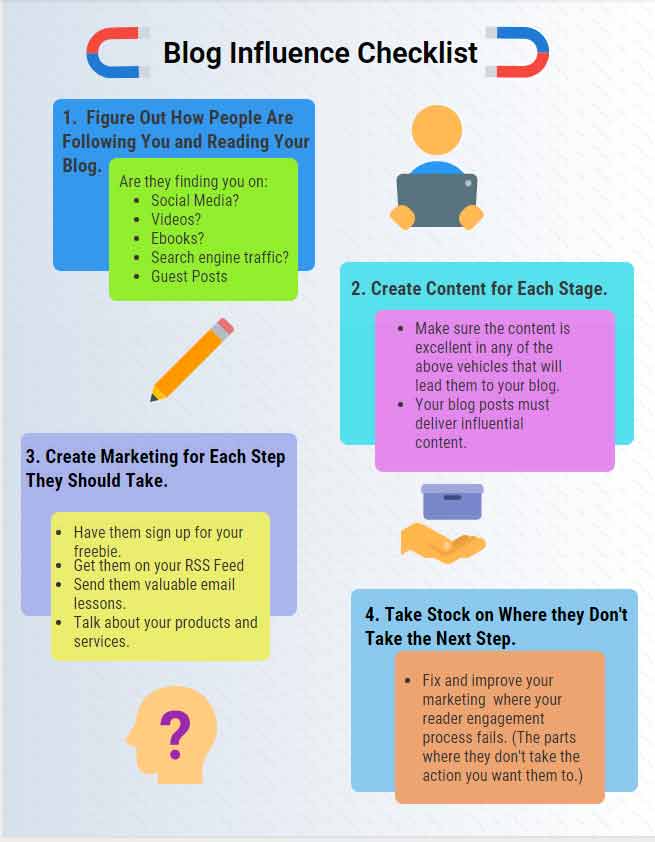
Conclusion to This Massive Ultimate Beginner’s Guide to Blogging for Money
At this point, you truly have more than enough information to get started on the road toward blogging for money. Yes — this guide is extensive. But that’s because building a real, sustainable online business requires real work. There are no shortcuts that last.
What is important, though, is that you keep learning as you move forward.
When I was a teacher, my favorite colleague was a science teacher who lived by one simple rule:
“A little learning is a dangerous thing.”
And he was right.
You must continually upgrade your knowledge and sharpen your skills if you want long-term success.
Blogging for Money Resources (Personally Recommended)
I never recommend courses, tools, or sites that I don’t personally use myself. Ever. That’s why I confidently share these with you:
Successful Blogging – Sue Dunlevie
Sue runs one of the most thorough blogging education platforms on the planet. She covers everything from content creation to serious monetization strategies. Her courses alone can shave years off your learning curve.
Jon Morrow
Jon is the Rolls-Royce of bloggers. I personally took his Guest Blogging course and got results simply by following his instructions. That almost never happens. His training is elite-level.
Neil Patel
Neil calls himself an SEO guy, but he’s really an entrepreneurial juggernaut. He’s launched multiple successful ventures and publishes massive, highly detailed posts on traffic and growth strategies. His content is pure gold.
Jon Carlton
Copywriter supreme. Blogging and copywriting go hand-in-hand, and Jon is one of the best alive. I’ve taken his Kick-A Copywriting Secrets** course and can honestly say it’s A++++ material.
Dan Kennedy
Dan isn’t technically a blogger — he’s a millionaire-maker in marketing. He has mentored countless high-level entrepreneurs. His books, courses, and seminars are world-class… and yes, he’s also one of the greatest copywriters ever.
Bob Bly
The copywriter’s copywriter. Over 96 published books on writing, marketing, and entrepreneurship. His course “The Internet Retirement Plan” is one of the best foundations for making money online. Studying Bob’s writing alone is an education.
The Gary Halbert Newsletter
Gary Halbert is considered the godfather of modern copywriting. Though he passed away, his archived newsletters remain some of the most powerful writing and marketing lessons ever published. You learn copywriting, storytelling, and entrepreneurship all at once.
Final Words You MUST Read (Or Your Blogging Dreams Will Die)
Years ago, I bought my very first Dan Kennedy book. It was a little stapled pamphlet called:
“The Ultimate Success Secret.”
It looked homemade.
But the message inside?
Life-changing.
Here it is — and this is what I leave you with:
The #1, high-octane, industrial-strength, life-changing factor you must implement immediately is…
TAKE ACTION.
I once heard the legendary motivational speaker Zig Ziglar give this perfect analogy:
“Jet aircraft are the most powerful machines on the planet. But when they sit on the ground too long, they rust, weeds grow around them, and they fall apart. They only stay strong when they are flying.”
And Zig was right.
If you take no action</strong>, your results will be no results<</strong>;/</strong>strong>.
Yes — you can take action and still fail.
s=”yoast-text-mark” />>Yes — you will stumble.
>Yes — you will have setbacks.
So did:
- John D. Rockefeller
- Oprah Winfrey
- Bruce Lee
- George Washington
Failure is not the enemy.
Stopping is.
That’s why I wrote this entire guide — so you can start with the right actions, not random ones.
Your Call to Action (Start Today — Even Small)
Right now, take these simple actions:
- Sign up for my email alert
- Get a free copy of my 200+ page manual “Blog Profiting Secrets”
- Start bookmarking and studying the resources listed above
Share this post if it helped you.
God Bless & Cheers to Your Success
Mark “Elmo” Ellis
All I can say is “Wow!!” Epic post, Mark. Loved every word of it.
I’ll be linking to this one.
Sue
P.S. Thanks also for the shout-out
Informative post! you shared with knowledgeable details on the post.
I would definitely use this method. Thanks for sharing the article.
Swanky,
Thanks so much my friend. I’m glad you got something out of it. Of course, you won’t get far with out putting this stuff into action.
Sue,
Thank you so much for commenting. It’s great to hear from a top-notch leader in the blogging realm. I encourage all my readers to go to your site because it’s one of the fastest ways to learn how to make money blogging. Thanks again, Sue! You’re the best!
How many hours in a day should I devote to blogging? I would like within a year’s time to be dong this full time,
thank you for this informative blog,
will refer to it,
Renee
Renee,
It is very hard to say how long any success will take you on the Internet. It depends on a variety of factors:
The niche you’re working in
How much you write per week
The quality of your posts
How you are monetizing your blog
How you are promoting your blog
If you want to go full-bore on this, go to Sue Dunlevy’s Successful Blogging site. She has amazing courses that can get you started right away.
I wouldn’t just stop with her courses though, once you finish her’s I would take Jon Morrow’s Guest Blogging course as well. You will find that you need to constantly upgrade your skills and talents as you move through your blogging career.
I hope this helps!
Mark Elmo Ellis