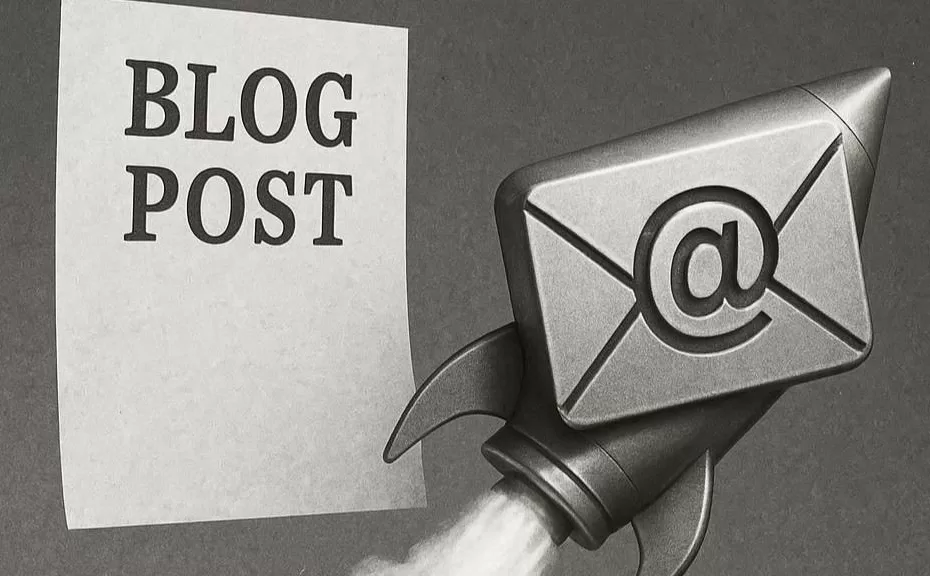




I could feel tiny paws slowly and quietly crawling onto my chest in the darkness. The creature curled up and pushed its cold nose under my hand.
“Don’t forget — you’ve got a lot of writing to do this morning,” it mewed.
I wanted to punch that cat right in its labonza.
Rubbing my eyes, I flopped down in front of my computer and stared at the screen.
“That furry pain in the ass was right,” I mumbled, a chunk of toast dangling out of my mouth. “I’m already behind this week.”
As I sat there chewing, I couldn’t help but think how my writing rhythm had slowed to a crawl.
And what really sucked was that my email readership had dropped off. Here I was, encouraging executive and business coaches to use email — and I was failing at it.
What to do?
Time to pull out another hack that could revive my email without sacrificing my blog posts.
Wanna know what this top-secret, live-on-the-razor’s-edge, laugh-in-the-face-of-death method is?
Keep reading and I’ll share it with you.
By the way — I hate it when cats are right.

The Quick Fix: Repurposing Blog Posts into Emails
If you’re a business coach, you need to learn how to http://childpsychiatryassociates.com/treatment-team/kathleen-morgan/kathleen_morgan-600/ repurpose blog posts into emails.
Why?
Well, unless you enjoy writing your ass off day and night, you need to take a few shortcuts.
I know you’re probably shocked that I’d suggest this, but let’s face it — your readers’ attention spans are short. And if you’re not connecting with them regularly, you’ll lose traction.
Just sayin’.
It’s probably safe to say your posts are good — but they’re still not getting enough traction.
And that means your writing feels… wasted.
(Stop reading if you think I’m off track.)
But don’t feel like the Lone Ranger — this happens to every single person who’s ever tried to blog.
So, in this post, I’m going to show you one hack that will increase your blog’s influence and bring in more readers.
And that hack is repurposing blog posts into emails.
Follow my advice, and you’ll gain a following even Napoleon Bonaparte would envy.
And now, Messieurs et Mesdemoiselles, I will reveal the secrets of how to repurpose blog posts into emails that will attract your followers en masse.
Blog Post Repurposing = Profitable Relationships
There are several profitable reasons you’ll want to repurpose blog posts into email messages. So if you’re a business or executive coach pay attention, because this post might help you influence and grow your audience.
Keeping Clients in the Loop
In the game of marketing your business, it’s always a good idea to be seen — again and again. That’s why big brands like McDonald’s, Pepsi, and Progressive have ads running nonstop — on TV, in magazines, everywhere.
Being seen constantly = big money, right?
Of course, you don’t have the big bucks to run massive ad campaigns – that game’s for the big-time players. And because they have the capital to stay visible, they can afford to run wild, funny, or flat-out bizarre commercials without listing a single benefit or feature.
A good example is this award-winning car commercial from Nissan:
By the way, Nissan’s sales plummeted when this aired — because it didn’t give buyers a single reason to buy.
But if you’re a small business or an executive coach, you’ve got to be more strategic with your time, money, and energy. Repurposing blog posts (or sections of them) into email messages is an easy way to stay in your herd’s mind.
Constantly Showcase Your Value
In the business-marketing game, you’ve got to prove your value to customers.
Ever put yourself on the email lists of some big-time influencer? Nary a day goes by without hearing from them.
Tony Robbins, Alex Hormozi, Grant Cardone — they all send constant emails to their subscribers.
Why?
To remind their audiences of the benefits of being part of their inner circle.
When you see their names in your inbox over and over, it’s only a matter of time before you click — or bite — on one of their offers. And if you’re constantly sending emails to your own crew, your offers feel… well… more natural.
Emails Are More Magnetic Than Blogs
Believe it or not, emails get more views and engagement than blog posts. Yeah, I could give you the stats on why email still reigns supreme, but why take a baseball bat to a dead horse?
So perhaps it’s time to pay more attention to your email list than your blog traffic.
Because emails are personal — they land directly in your reader’s inbox and take zero effort to access. That makes email feel more intimate and exclusive.
So here’s the play: write your blog posts with the idea that they can double as email fuel.
Think about it — you write a knock-your-socks-off post knowing it can also become an email message.
That’s a two-for-one deal that saves you time, money, and energy.
Boom. There it is.
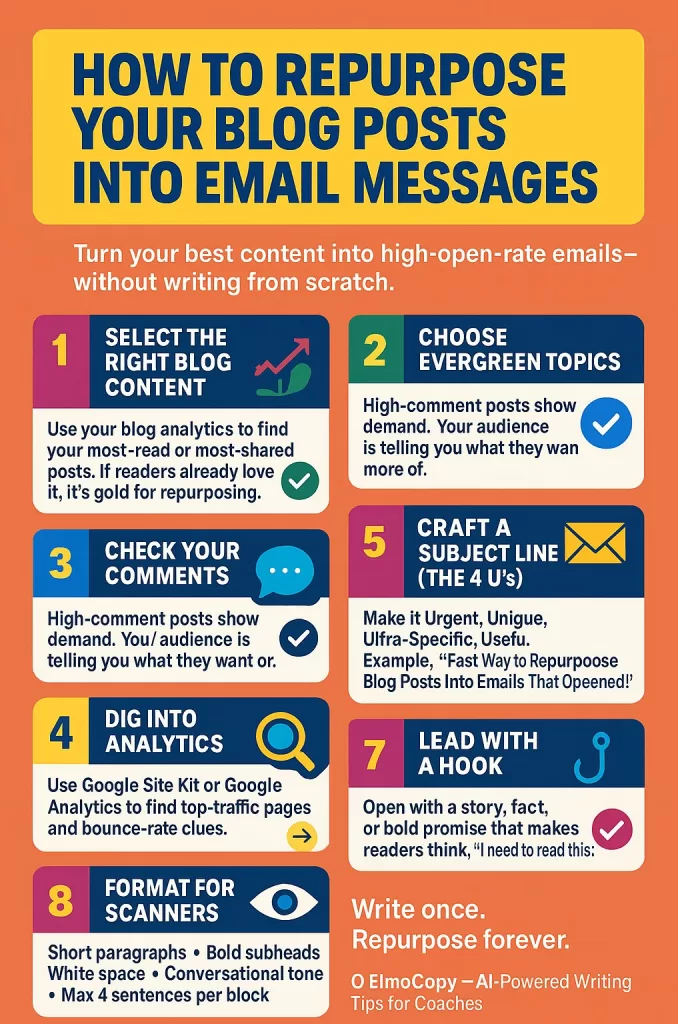
How to Repurpose Your Blog Posts into Email Messages
I’m going to show you how to turn your posts into email messages that actually get read. You don’t have to use an entire post because that would be too much. Some of my posts are 10,000 words long, and that would create a very large email.
Agree? (I knew you would.)
Step 1: Select the Blog Content You Want to Convert
Check your blog analytics to see which posts are getting the most traffic.
If a post is performing well, chances are the topic already resonates with your readers — perfect material for repurposing.
Step 2: Pick Evergreen Content to Repurpose
Evergreen content stays fresh, relevant, and useful for a long time. In the coaching realm, evergreen topics might include mindset, personal growth, or client relationships.
These types of subjects almost always remain popular with your readers.
Step 3: Check Your Comments
If a post gets a lot of comments, that’s a good sign you’ve hit on a popular topic. Check which posts are generating the most engagement — your readers are literally telling you what they want more of.
Step 4: Use Analytics to Find Content Treasure
I use two versions of the same analytics tool to track my blog’s traffic:
Google Site Kit (the WordPress version of Google Analytics) and Google Analytics itself.
Site Kit is less technical and more user-friendly than its big brother, but they’re essentially the same tool.
Analytics show you how much traffic your site gets and which pages pull the most hits.
They also reveal your bounce rate — how quickly people leave your pages. If you’ve got a high bounce rate, it likely means your content isn’t grabbing attention — because if it did, visitors would stick around longer.
Step 5: Create a Subject Line
Here’s how I write headlines: I use what I call the 4 U’s.
Your subject line should be Urgent, Unique, Ultra-Specific, and Useful. If you can’t hit all four, three will still do the job.
For example, the title of this post is “Fast Way to Repurpose Blog Posts into Emails That Get Opened.”
It’s useful, urgent, and unique. (I could have made it even more specific by mentioning it’s for coaches or content writers.)
Step 6: Collect a Bunch, Then Trim the Fat
Take one of your blog posts that you want to repurpose into an email, and remove all the extra fluff.
Look for that nugget of information that grabs attention.
Copy the section you want to use, paste it into your favorite word processor, and read it out loud. Then trim most of the fat — while keeping it tight, clear, and punchy.
Step 7: Lead with a Hook
Start with a fun fact, an interesting story, or a bold promise.
Your hook should make readers think, “Whoa, I need to read this.” That’s what pulls them into the rest of your email.
Step 8: Add a Call to Action About Your Post
You’ve got to tell your readers what to do next — that’s just how it works. Give them inspiration, motivation, and a reason to click through to your post.
Good calls to action include:
- “Grab the checklist.”
- “Read the full post.”
- “Reply in the comments.”
Step 9: Format Your Email for Maximum Engagement
You want your emails to be scannable.
Why?
Because that’s how most people read online — they skim for something that grabs them.
If you want to see great formatting in action, check out magazine ads — especially from the 1970s.
They understood how to design for scanning readers long before the internet existed.
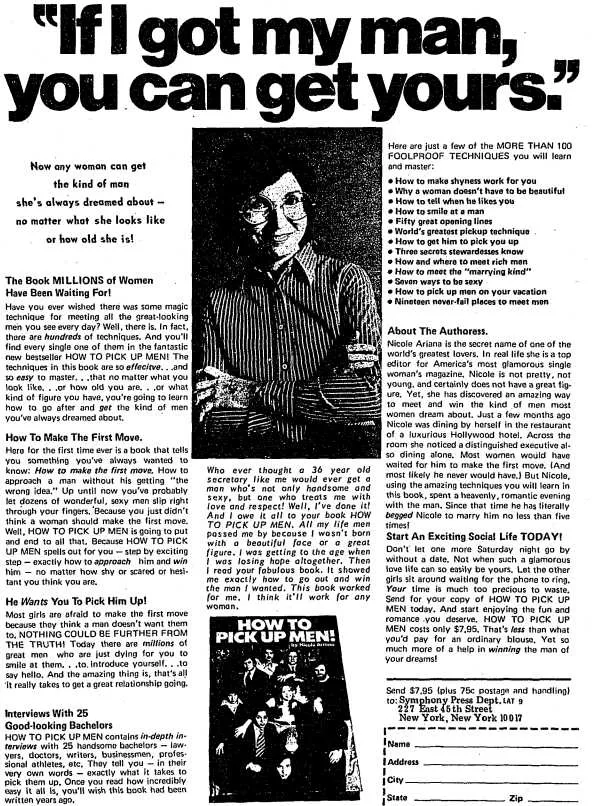
Here’s how to make your emails pop for skimming eyes:
- Use short paragraphs.
- Add subheads and bold text for emphasis.
- Break up long blocks with white space.
- Write like you talk — fast, clear, and personal.
- Don’t group more than 4 sentences together at once.
Use a Personal Conversational Tone for Better Conversions
I like to call this across-the-table writing. You know — like you’re sitting across from a friend, trying to explain something over a cup of java?
Why write like this?
Because you’re talking to human beings, and it’s far more relatable.
Did you notice the story at the beginning of this post? I deliberately dropped you right into the middle of it to draw you in. Once you’re in, it’s easier to keep you reading.
If I just gave you reasons and then a bunch of dry steps, you’d be bored stiff. That’s why most people hate reading instructions — they’re boring, dry, and unrelatable.
For folks in the coaching or consulting world, writing nothing but instructions doesn’t build authority, either. I’m not talking about arrogant authority — I mean friendly, relatable authority. You want to be seen as the go-to guy or gal in your field, not a Gordon Ramsay barking orders.
And hey, it’s also more fun to write this way.
(Oh, snap! That’s another reason I just blabbed out.)

Links! Let’s Not Forget the Links!
Yep — you’ll need to embed relevant links when you repurpose blog posts into emails.
But what’s the best way to do it?
Ask yourself two things:
- Are the links relevant to the topic?
- Do they serve your readers, or just you?
If you’re dropping links only to sell, you’ll look like a huckster.
Instead, make your links serve the reader. Sure, sometimes you’ll sell — but most of the time you’ll point to resources that add real value.
Here are four easy ways to place links when turning blog posts into emails:
- Blog post preview → link to read the full article
- Story or example → link to a case study or testimonial
- Tip or resource → link to a lead magnet or service page
- Call to action → link to schedule, buy, or subscribe
You can mix these up depending on the flow, but four or five links are plenty.
If I’m going to personally benefit from a link, I make it the last one — because if you’ve read that far, your odds of buying whatever I’m hawking are way higher.
One last thing about using “link-a-dinks”: keep them conversational.
As a copywriter, I love calls to action — but not fake ones.
“Hurry, click the link to buy this pen before my inventory runs out!”
Nah. Sounds a little disingenuous, doesn’t it?
Instead, embed links naturally inside your sentences. (Didja see what I just did there? I’m brilliant. Thank you!)
Follow these few simple link rules, and your repurposed posts-turned-emails will perform a whole lot better.
How to Repurpose Blog Posts into Emails — An Example
Before I send you off into repurposing bliss, here’s an example:
Blog version:
“When you repurpose your blog posts into social media content, you save time and extend the life of your ideas. Each post can become a week’s worth of tweets, carousels, or reels — all leading back to your website.”
Email version:
“Ever feel like your blog posts die after one week?
Here’s the fix: turn one post into a whole week of content.
Tweets, carousels, reels — all of it points right back to your site.
You’ve already done the hard work once. Now make it pay rent.”
Now, I know what you’re thinking: “Geez, he rewrote that entire section. How does that make writing easier?”
Simple — the hard work was already done in the original post.
All you have to do is take that piece, tweak it, and you’re golden. No outline, no new ideas — just reuse and refine.
Not only are you repurposing, but you’re also sharpening your editing chops.
When I repurpose my posts, that’s how I roll — I rewrite them into simpler, punchier messages for my emails. But if you’re really pressed for time (or just want to be lazy — yeah, I said it), there’s another method…

Using AI to Repurpose Your Blog Posts into Emails
Here’s the fast, super-easy way: Copy a section of your post and drop it into your favorite AI platform.
Let’s take that same blog section and turn it into an email you can use.
Original post segment:
“When you repurpose your blog posts into social media content, you save time and extend the life of your ideas. Each post can become a week’s worth of tweets, carousels, or reels — all leading back to your website.”
Despite what you hear, prompts aren’t hard. Just tell your AI buddy exactly what you want.
Here’s one you could use:
Rewrite this in a simpler, snarkier style and add a bit of humor and value:
“When you repurpose your blog posts into social media content, you save time and extend the life of your ideas. Each post can become a week’s worth of tweets, carousels, or reels — all leading back to your website.”
Here’s what ChatGPT (I use the paid version) churned out:
“Stop letting your blog posts die a lonely death after one week.
Slap a new outfit on that content and send it back into the world — tweet it, spin it into a reel, or turn it into a post that actually gets read.
Boom — one blog becomes a week’s worth of stuff. You just saved time and made your words work overtime. You’re basically running a content recycling plant… but without the weird smell.”
Not bad, right? Pretty awesome rewrite if you ask me.
Why You Need to Write Your Own Stuff
If you’re writing a dry comparison of solar panel brands, sure — let AI handle it.
(It’s one of the most boring topics on Earth. Trust me. I’ve done it. Never again.)
AI spits out that kind of thing fast and clean.
But if you’re trying to make a human connection, you’ve got to do it yourself — because people can tell.
Humans have emotions, dang it, and that’s what people connect to.
Watch this clip from Peggy Sue Got Married.
Humans write from real emotion and experience — and that’s why we have personality.
So, if you just want to dial in your writing, let AI be your conscience.
But if you want to spill your guts and let your charisma shine, do it yourself.
Conclusion
Let’s face it — time is limited for most of us, especially if you’re running a business in executive coaching or copywriting.
Whatever your field, if you want to deepen relationships and magnetically draw the right people to you, email is the way to go.
When you repurpose blog posts into emails that actually sound like you, you’ll build a loyal herd that sticks around for years.
Let me know what you thought of this magnificent dissertation in the comments below — just hit “reply” and tell me which of your blog posts you’ll start with.
See you at the top!